| Xerces-Com.DLL Error Message using Visual Studio .NET and Vista |
| Author |
Message |
|
|
| Posted : 2008-01-17 13:22:10 |
Hi there,
I've been developing a C# application to produce reports pulled from a Quickbooks workbook. I've been using QODBC as the ODBC driver. Here's my issue.
Every works perfectly when I am running my application from Visual Studio .NET 2005.
When I run the compiled program outside of the IDE, I get a very very odd message:
"Installation incomplete on required module xerces-com.dll"
I get this message on three different windows vista computers.
I've followed the installation instructions to the T. I can use Excel no problem to pull data from Quickbooks, but it just doesn't want to work with my application.
Again, the weird thing is, if I run the application from the .NET IDE, it works perfectly.
I've tried running the application as an admin and a standard user, and the same issue.
Has anyone seen this at all?
Please help!! :)
Thank you so much |
|
|
|
| Tom |
 |
| Group | : Administrator |
| Posts | : 5510 |
| Joined | : 2006-02-17 |
|
| Profile |
|
| Posted : 2008-01-17 13:47:56 |
| Ok, if your application runs as a service or through a service (like via a browser), then it's not going to work under Windows Microsoft Vista. Try running your compiled application on Windows XP. |
|
|
|
|
|
| Posted : 2008-01-17 14:30:30 |
Hi Tom,
Thanks for the quick response.
It's just a standard windows application, no browser at all.
I need to get this running under Windows Vista.
When I run it from the IDE (Visual Studio 2005) it runs no problem as mentioned below...When I run the compiled EXE it gives the error below.
What exactly is the xerces-com.dll?
I cant find any help with this issue anywhere else online.
It's very important I can get this to run under WIndows Vista, I really don't have a choice.
Why does Excel/Acces work and a .NET application using the Odbc driver cannot?
Thanks Tom,
Matt |
|
|
|
| Tom |
| |
| Group | : Administrator |
| Posts | : 5510 |
| Joined | : 2006-02-17 |
|
| Profile |
|
| Posted : 2008-01-17 17:21:16 |
xerces-com.dll is an ActiveX component that's normally already installed by QuickBooks. You can try renaming what ever version of xerces-c_2_x.dll you have to xerces-c_2_x.bad and xerces-com.dll to xerces-com.bad and re-running the QODBC installation program which will do:-
File Overwrite: C:\WINDOWS\system32\xerces-c_2_x.dll
File Overwrite: C:\WINDOWS\system32\xerces-com.dll
Self-Register: C:\WINDOWS\system32\xerces-com.dll
and check the botton of the install log found at: C:\Program Files\QODBC Driver for QuickBooks\INSTALL.LOG that it has done it.
QuickBooks and your .NET application needs to run under Standard permissions. Your application must not run elevated to run as administrator. |
|
|
|
|
|
| Posted : 2008-01-17 22:45:50 |
Hi Tom,
I had already tried this. I reinstalled after renaming the DLLs and also as an admin and standard user. Both I get the SAME error messsage.
What bothers me is, WHY does it work when I just hit the Run button in Visual Studio .NET and not when I run the executable (Standard or Admin)
What is different?
I know you mentioned the below fix to another user:
You can try renaming what ever version of xerces-c_2_x.dll you have to xerces-c_2_x.bad and xerces-com.dll to xerces-com.bad and re-running the QODBC installation program which will do:-
File Overwrite: C:\WINDOWS\system32\xerces-c_2_x.dll
File Overwrite: C:\WINDOWS\system32\xerces-com.dll
Self-Register: C:\WINDOWS\system32\xerces-com.dll
And it did not work for him. It's not working for me either.
Do you have any other ideas?
Thanks!
Matt
|
|
|
|
|
|
| Posted : 2008-01-17 22:58:38 |
On another note, when you run the process with the Visual Studio Hosted Process (through vshost) which is default when running an application through the IDE it works perfectly.
When you disable this option under VS .NET / Properties / Debug -- Uncheck use Vshost
It does not work.
Tom do you have any ideas? |
|
|
|
| Tom |
| |
| Group | : Administrator |
| Posts | : 5510 |
| Joined | : 2006-02-17 |
|
| Profile |
|
| Posted : 2008-01-18 07:47:01 |
Sorry no, this seems to be a Visual Studio.NET issue under Vista. Suggest you try out your application on a Windows XP workstation and look at the Microsoft support forum for what code changes you need to do for Vista.
The "Installation incomplete on required module xerces-com.dll" error, up to now, has only occured with applications that run as a Windows Service, like ColdFusion, and when the QODBC connection is overrun with to many queires at once. |
|
|
|
|
|
| Posted : 2008-01-18 08:00:04 |
Tom,
I'm sorry but you are incorrect. It's not a Visual Studio Issue.
I get the SAME error message when I run the example off of QODBC's website. This is the VBS example pulled directly from QODBC.com:
Const adOpenStatic = 3
Const adLockOptimistic = 3
Dim oConnection
Dim oRecordset
Dim sMsg
Dim sConnectString
Dim sSQL
sConnectString = "DSN=Quickbooks Data;OLE DB Services=-2;"
sSQL = "SELECT Name FROM Employee"
Set oConnection = CreateObject("ADODB.Connection")
Set oRecordset = CreateObject("ADODB.Recordset")
oConnection.Open sConnectString
oRecordset.Open sSQL, oConnection, adOpenStatic, adLockOptimistic
sMsg = "**********************" & Chr(10)
Do While (not oRecordset.EOF)
sMsg = sMsg & oRecordSet.Fields("Name") & Chr(10)
oRecordset.MoveNext
Loop
sMsg = sMsg & "**********************" & Chr(10)
MsgBox sMsg
oRecordset.Close
Set oRecordset = Nothing
oConnection.Close
Set oConnection = Nothing
I get the exact same error with xerces-com.dll.
I cannot believe that I am the only person seeing this issue.
Again this is on 3 different Vista computers.
There has to be something with the product that is not right.
Thanks again for your help,
Matt |
|
|
|
| Tom |
| |
| Group | : Administrator |
| Posts | : 5510 |
| Joined | : 2006-02-17 |
|
| Profile |
|
| Posted : 2008-01-18 08:36:48 |
As stated in the start, if a application runs as a service or through a service, like via a browser or the Windows Script Host service (shown here), then it's not going to work under Windows Microsoft Vista!
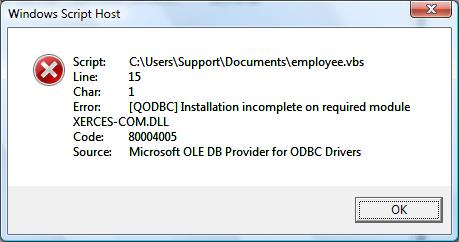
The QODBC product only works with desktop applications on Microsoft Windows Vista and needs to run under Standard permissions. No application can run elevated to run as administrator through a Windows Service. |
|
|
|
|
|
| Posted : 2008-01-18 09:26:39 |
Hi Tom,
Ahh thanks for clearing that up.
Well I try and run the application as a standard user and I get the same error message.
If I run the VB Demo app as an admin it works fine! In elevated mode.
So, I don't think the elevated mode has anything to do with it..If it did, then how can I run the VB DEmo as an admin?
The .NET application does not work with or without standard permissions.
On another note, when I run it through the vshost (through the IDE) I the window which starts running the "QODBC Vista Helper" and it works!
When I run it just the executable (standard or admin) I dont even see the Vista Helper application launch.
|
|
|
|
| Tom |
| |
| Group | : Administrator |
| Posts | : 5510 |
| Joined | : 2006-02-17 |
|
| Profile |
|
| Posted : 2008-01-18 10:34:09 |
I've asked the QODBC Software Engineer for further documentation/information on how we can hook into the "QODBC Vista Helper" under QSupport Ticket ID: ER00000023. I don't have a time frame on when he will respond. The QODBC Vista Helper is used to allow things like the QODBC Setup Screen to run in elevated mode.
|
|
|
|
|
|
| Posted : 2008-01-18 10:43:27 |
Excellent Tom.
Keep me posted.
Thank you! |
|
|
|
|
|
| Posted : 2008-01-18 23:43:47 |
Tom,
Is there a way I can plug in this helpdesk ticket to see the activity?
Thanks,
Matt |
|
|
|
|
|
| Posted : 2008-01-25 08:31:21 |
Tom,
Any news on this? I'd like to get this thing working. It's been over a week.
Thanks,
Matt |
|
|
|
| Tom |
| |
| Group | : Administrator |
| Posts | : 5510 |
| Joined | : 2006-02-17 |
|
| Profile |
|
| Posted : 2008-03-29 07:43:13 |
I guess we could try icalcs on the XERCES-COM.DLL and the XERCES-C_2_6.DLLs to set the permissions to everyone.
regsvr32 "%windir%\system32\xerces-com.dll" /unregister
Icacls "%windir%\system32\XERCES-COM.DLL" /Grant:r everyone:F
Icacls "%windir%\system32\XERCES-C_2_6.DLLs" /Grant:r everyone:F
regsvr32 "%windir%\system32\xerces-com.dll"
Please let me know if this fixes your Xerces-Com.DLL Error Message?
|
|
|
|
|
|
| Posted : 2008-08-14 23:20:12 |
Hi Tom,
I basically gave up trying to get this to work using C#, and I came back and tried your suggestion and still had the same issue.
Here's the thing, if I run the test application (all I do is open a connection) and run it in debug mode under Visual Studio it works fine. This is because it's being ran through the vshost
process. Now I wrote a program that views the elevated permissions of an application and it came back that the elevated permissions
of the process "Test.vshost.exe" is limited, which is what we want, meaning it's not being ran as an administrator.
Now if I compile the program and run it (not through vshost) I get that error, xerces-com.dll not installed properly.
What I noticed is, if I unregister xerces-com.dll through regsvr32 and run it through vshost, I get the same error. So what I'm thinking is, is that
it cannot find the xerces-com.dll, maybe since it can't access the registry to pull up the information?
So I decided to copy the 2 DLLs to a test folder and unregister them from system32 and re-register them there. Same issue, the vshost process
can see them there and it works, and when I compile it does not work.
I've tried this on 6 separate Vista builds and all have the same issue.
There has to be some kind of logical explanation why this is happening and I have to assume that your development team has seen this before.
Has ANYONE else successfully ran QODBC under Vista with a C# or VB .NET compiled application?
I'm at the point where I really need to get this to work.
Thanks for your help Tom,
Matt |
|
|
|
|
|
| Posted : 2008-08-21 03:50:05 |
Tom,
Anyway you could get me a response please?
This issue is very easy to reproduce. I can't imagine more people haven't posted about this.
Am I the only one using QODBC in a .NET / Vista environment????
Matt |
|
|
|
|
|
| Posted : 2008-08-27 07:39:49 |
Tom
I am also developing an application under Vista, QODBC and vb.net. I am having the same issues stated in this Topic.
I can run my application from within Visual Studio 2005 and Visual Studio 2008 without any issues, but when I attempt to run it outside of the Visual Studio Environment it will fail with INSTALLATION INCOMPLETE ON REQUIRED MODULE XERCES-COM.dll.
This is not a problem in Visual Studio, I am running this as a Standard User and not as a service or Administrator.
Please Advise
Thanks
-Peter |
|
|
|
|
|
| Posted : 2008-09-03 03:37:49 |
I Don't understand why this problem isn't being addressed by the company.
It's a common issue and can easily be reproduced.
Matt
. |
|
|
|
|
|
| Posted : 2008-09-08 12:43:59 |
Hi Tom,
I have the same problem and have come to the end of the investigations I can do myself.
My Situation:
Vista SP1
Visual Studio 2008 SP 1
QODBC updated to 8.00.00.242
Tests:
I can run the following VBA code successfully from Access:
Dim cn As ADODB.Connection
Set cn = New ADODB.Connection
cn.ConnectionString = "Driver={QODBC Driver for QuickBooks};DFQ=C:\data\myfile.QBW;" & _
"SERVER=QODBC;OptimizerOn=No;OpenMode=F;OLE DB Services=-2;ColumnNameLen=31"
cn.Open
Dim rs As ADODB.Recordset
Set rs = cn.Execute("SELECT TOP 1 * FROM Customer")
rs.Close
cn.Close
Set cn = Nothing
The same (or similar translated) code fails in dotnet on the Open method with the error message: "Installation incomplete on required module xerces-com.dll"
I get the same results whether I have UAC on or off.
I have used Process Monitor to look at both the successful VBA call and the unsuccessful dotnet call and it appears that the unsuccessful call can still load xercer-com and the xercer-c_2_6 dlls but the dotnet version fails during a processing of one of the calls in the parser during what look to be namespace handling and some zone security checking.
I would be happy to supply you with these logs it if helped.
Are you able to shed any light on the matter for me.
Cheers
Simon |
|
|
|
| Tom |
| |
| Group | : Administrator |
| Posts | : 5510 |
| Joined | : 2006-02-17 |
|
| Profile |
|
| Posted : 2008-09-09 00:04:33 |
| This is an intersting issue because if you take a new notebook with the original version of Vista installed on it, the problem doesn't happen. If you then apply the cumulative updates (not even Vista SP1) the problem presents itself. |
|
|
|
|
|
| Posted : 2008-09-09 00:30:37 |
Tom,
I would bet that this issue is something with security. The vshost.exe process that when you debug a process in dotnet it runs and sets up the necessary security and namespaces.
If you run the same EXE not through the vshost.exe it does not work at all.
Maybe your team can look into what exactly the vshost.exe is doing that makes it work properly?
Thanks,
Matt |
|
|
|
|
|
| Posted : 2008-09-09 07:29:17 |
Hi Tom,
Thanks for the reply. It sounds like you have been able to replicate this error in that case???
To be unambiguous, are you saying that it works with a freah install of Vista, and a Fresh install of Vista SP1 but not an install of Vista that has been upgraded to SP1??
Yes I have a Vista Machine that was pre SP1 and then has had SP1 run on top of it. Are you able to suggest what may be going on, or what I could do to fix it?
Do you think it is to do with the upgrade process and some underlying difference in SP1
OR is it just that QODBC was installed prior to the upgrade.
I.e. have you observed a QODBC re-install fixing the problem?
If so, what is the best media to reinstall from. I have a version 7 install with a version 8 upgrade. Should I try (or is there) a straight version 8 install package (and if so where can I get fresh media).
Cheers
Simon |
|
|
|
| Tom |
| |
| Group | : Administrator |
| Posts | : 5510 |
| Joined | : 2006-02-17 |
|
| Profile |
|
| Posted : 2008-09-09 09:38:55 |
| The QODBC Software Engineer loaded a new version of Vista on his notebook and said what problem. My Vista notebook has cumulative updates applied (but not SP1 at that stage) and was broken and as far as I can tell it's the same for everyone else. I will try to get him to re-investigate with SP1 applied. |
|
|
|
|
|
| Posted : 2008-09-09 09:47:54 |
So have you found a solution that fixed your notebook?
Is this something that is still being investigated actively.
I am happy to help try and debug the issue.
Cheers
Simon |
|
|
|
| Tom |
| |
| Group | : Administrator |
| Posts | : 5510 |
| Joined | : 2006-02-17 |
|
| Profile |
|
| Posted : 2008-09-14 14:58:34 |
I now believe this to be a Microsoft introduced issue. See: DEP in the last post in: Visual Studio 2008 (with Vista) fast in forms app but slow in web app (website)
DEP is Data Execution Prevention.
It is Microsoft trying to stop viruses. Basically if an application kicks off another application (or something along those lines), it will think that the application could be a virus and shut it down. QODBC kicks off Quickbooks and I think this triggers the DEP. (You also get similar reactions when you run certain video codecs.)
To disable DEP:
bcdedit.exe /set {current} nx AlwaysOff
To enable DEP again:
bcdedit.exe /set {current} nx OptIn
You must restart your computer to commit the changes to DEP. Let me know how you get on. |
|
|
|
|
|
| Posted : 2008-09-15 08:58:02 |
Thanks for the tip Tom.
Unfortuneately ( and probably totally unrelated to QODBC) switching off DEP as described causes my copy of Vista to fail to boot with a bluescreen due to a driver failure. Switching it back on fixes this bluescreen.
However during the fix it phase I learnt interestingly, when I have DEP enabled for ALL programs, many other programs crash due to DEP, but leaving it at its default setting of 'OptIn' and those programs work correctly.
My conclusion here is that if it really is DEP causing the issue, there must be another work around, as many other programs seem to do this.
The default settings ==DEP on for system processes, DEP off for other programs. Can you get QODBC to fit into the 'other programs' category.
Cheers
Simon |
|
|
|
|
|
| Posted : 2008-09-19 05:23:27 |
Tom,
I'm in the same boat as Simon. I can't disable DEP because of the explanation mentioned above and I can't run this in VB6 anymore.
The SQL calls take entirely too long and I need to run it in a multi threaded environment and I can't do that with VB6.
Can you please give us a status whether this is going to be fixed or not?
Thanks,
Matt |
|
|
|
| Tom |
| |
| Group | : Administrator |
| Posts | : 5510 |
| Joined | : 2006-02-17 |
|
| Profile |
|
| Posted : 2008-09-22 08:35:18 |
|
|
|
|
|
| Posted : 2008-09-22 11:58:08 |
So QODBC's official stance for clients is to disable DEP which could further compromise the server/client just to get this to work?
Isn't there a cleaner approach that can be done from QODBC's stand point?
I can't convince our admins to disable DEP on production servers.
As more and more companies go to Vista/Windows Server 2008 and more and more companies convert applications to .NET, if this isn't fixed on QODBC's side, don't you fear it would be preventing some sales or potentially upsetting customers?
Thanks,
Matt |
|
|
|
| Tom |
| |
| Group | : Administrator |
| Posts | : 5510 |
| Joined | : 2006-02-17 |
|
| Profile |
|
| Posted : 2008-09-22 21:13:31 |
You clearly don't understand that:-
a) DEP is a Microsoft feature released with Microsoft Windows Vista. It has nothing to do with QODBC that has been working since 2002, originally on Windows 98 systems.
b) QODBC uses the Intuit qbXML SDK which invokes QuickBooks as either a foreground or background task. It is this that may invoke a DEP violation.
And yes, we do fear that Microsoft are potentially upsetting QuickBooks customers who need to use the Intuit qbXML SDK with applications like QODBC.
|
|
|
|
|
|
| Posted : 2008-09-22 21:45:26 |
Tom,
I do understand. I know exactly what DEP is.
The thing is, Microsoft isn't going to change. If you want your product to work for this century with modern OS and a modern application development framework, your product has to change.
My question is, is there a fix in the works or are all customers forced to disable DEP if they want to work with QODBC with Vista?
I hope its the former and not the latter.
Thanks for your help,
Matt |
|
|
|
| Tom |
| |
| Group | : Administrator |
| Posts | : 5510 |
| Joined | : 2006-02-17 |
|
| Profile |
|
| Posted : 2008-09-23 09:25:33 |
| That question would be better directed to Intuit the actual creators of the SDK and QuickBooks. |
|
|
|
|
|
| Posted : 2008-09-23 11:45:19 |
Hi Tom,
Could you direct me to the creators of the SDK? Do you know the best place to repost this question regarding the SDK??
Thanks for your help.
Cheers
Simon |
|
|
|
| Tom |
| |
| Group | : Administrator |
| Posts | : 5510 |
| Joined | : 2006-02-17 |
|
| Profile |
|
| Posted : 2008-09-23 20:54:54 |
|
|
|
| Tom |
| |
| Group | : Administrator |
| Posts | : 5510 |
| Joined | : 2006-02-17 |
|
| Profile |
|
| Posted : 2008-10-03 07:53:42 |
To fix it I did a Run As Administror of the command prompt then ran the:
regsvr32 "%windir%\system32\xerces-com.dll"
and the registration worked fine and then QODBC worked.
|
|
|
|
|
|
| Posted : 2008-10-03 22:51:54 |
Tom,
I remember trying this months ago with no luck.
You were able to register the DLL as an admin and with DEP ENABLED, run QODBC without issues?
The DLL is registered, the error that installation is not complete is misleading.
Matt |
|
|
|
|
|
| Posted : 2008-11-03 13:14:54 |
Hi Tom + Matthew,
I have made some small advances but still have one error that stops me using Visual Studio nicely.
Firstly, I can build a c# application that uses QODBC and I can do this with UAC ON OR OFF.
While turning DEP off system-wide crashed windows entirely, I was able to turn DEP off for the exes that are Visual Studio 2008 (devenv.exe) and the hosting process (using a copy of vshost.exe) this way I am able to at least get going.
I can supply details if anyone is interested.
My problem now is that I would like to add design time support in Visual Studio 2008 but adding a QODBC connection into the server exlplorer window, when I test my connection I do get a popup in QB telling me that Flexquarters QOBDC is trying to access QB, but instead of asking me whether to allow this and what user to login as, it says the certificate is not valid and 'Quickbooks will not allow an application with an invalid certificate to access you company file'.
Has anyone experienced this, or have a suggested fix.
Cheers
Simon |
|
|
|
| Tom |
| |
| Group | : Administrator |
| Posts | : 5510 |
| Joined | : 2006-02-17 |
|
| Profile |
|
| Posted : 2008-11-03 21:18:53 |
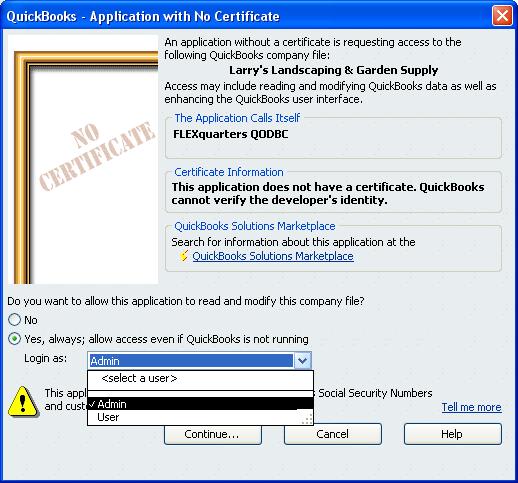
QODBC doesn't have a certificate and works for thousands of users so far.... check your QuickBooks security settings.
|
|
|
|
|
|
| Posted : 2008-11-04 00:38:07 |
Hi Simon,
I'd be very interested to know how you disabled DEP for your compiled EXE? It actually worked for you?
Turning off DEP system wide is also not possible for me. Is there a way that you found that you can disable it for just an EXE?
Thanks for your help!
Matt |
|
|
|
|
|
| Posted : 2008-11-04 06:32:31 |
Hi Tom,
Thanks, yes I see that screen from every other application (VBDemo, my c# app, an excel app etc) but I see something different when I try from Visual Studio 2008 and I don't know why. Obviously the call is getting through but is somehow different:
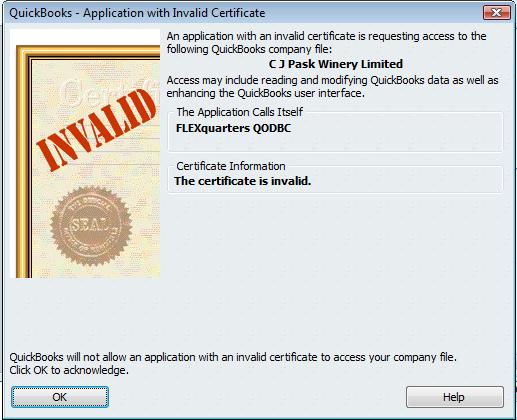
Notice there is no option to choose the user etc. Have you seen this behaviour before? Even if you know what might cause this behaviour difference so I can investigate a possible solution.
Cheers
Simon |
|
|
|
| Tom |
| |
| Group | : Administrator |
| Posts | : 5510 |
| Joined | : 2006-02-17 |
|
| Profile |
|
| Posted : 2008-11-05 10:45:09 |
|
|
|
