| Remote Connector asking for password |
| Author |
Message |
|
|
| Posted : 2007-08-10 13:08:35 |
I am doing some dev work with the simple start version of QB, I intend to used the remote connector to create a linked server in SQL 2005 and do some integration jobs to pull QB data into a datamart for a client. For some reason I am prompted for a password which I do not know. I've reset the co password on the sample db to blank. Any ideas what I am missing? At this point I am just working on my dev machine, an XP Workstation (not a server).
thanks! |
|
|
|
| Tom |
 |
| Group | : Administrator |
| Posts | : 5510 |
| Joined | : 2006-02-17 |
|
| Profile |
|
| Posted : 2007-08-10 22:06:22 |
|
|
|
|
|
| Posted : 2007-08-11 02:46:31 |
Thanks Tom,
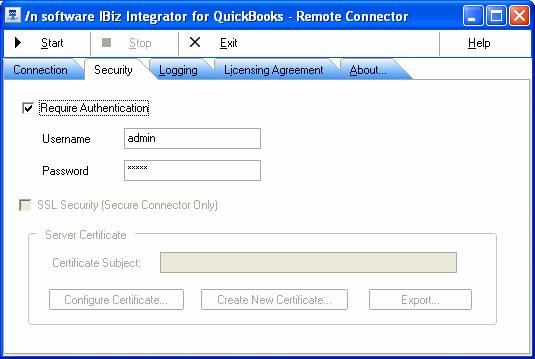
Even if I have require authentication unchecked I am still presented with a login but admin & null password does not work. I am using the simple start version with the sample database. I have verified that the password is null on that file. Just to be sure I downloaded the new version this morning (.214) but the problem is still present.
I need to use this to fill up a datamart for a client... I hope I can get it to work!
thanks
LindaB |
|
|
|
|
|
| Posted : 2007-08-11 02:57:45 |
I was able to solve it! That's what a good nights sleep will do :-)
The cert was not registered within QB. Somehow when I uninstalled, it went away but didn't come back when I reinstalled. I set QB to always ask about certs and when I fired the thing off again, it asked... I said ok and I was able to get a connection.
Now, I can get to work on DTS package. Thanks! |
|
|
|
| Tom |
| |
| Group | : Administrator |
| Posts | : 5510 |
| Joined | : 2006-02-17 |
|
| Profile |
|
| Posted : 2007-08-11 08:31:00 |
|
|
|
|
|
| Posted : 2007-08-11 09:08:25 |
Thanks Tom.
I did what you asked. Sucessfully used the VBdemo in unattended mode. Then setup the Remote connector and when I run VBdemo it asks for Login. I know the password is the password for the co file. In this case it is null. And I've told the connector to NOT require authentication. This is pretty urgent as I am up against an install deadline myself.
Could this be because I am using the free trial of quickbooks? the Simple Start? I do not want to have to BUY a copy of QB then find it's the same problem. Maybe it's that problem with the SDK? |
|
|
|
| Tom |
| |
| Group | : Administrator |
| Posts | : 5510 |
| Joined | : 2006-02-17 |
|
| Profile |
|
| Posted : 2007-08-11 09:19:26 |
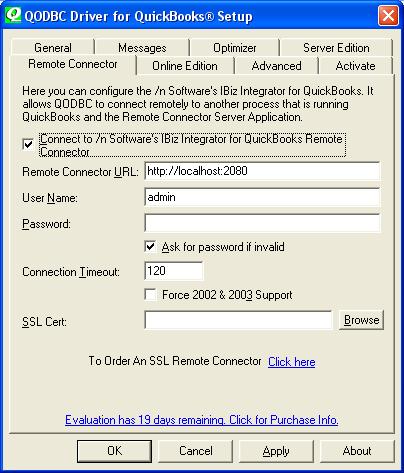
| Check that the User Name is setup correctly as "admin" and try unchecking "Ask for password if invalid".
|
|
|
|
|
|
| Posted : 2007-08-11 09:38:29 |
yes, that is what it is.
it prompts me with a login box with the admin as the user, password on that file IS null. |
|
|
|
| Tom |
| |
| Group | : Administrator |
| Posts | : 5510 |
| Joined | : 2006-02-17 |
|
| Profile |
|
| Posted : 2007-08-11 23:33:16 |
| Ok leave the password blank and hit the OK button. Is the connection succussful? I'm guessing not and that's why the login screen is happening. |
|
|
|
|
|
| Posted : 2007-08-12 01:15:40 |
No it's not sucessful. If it were I could just put a password in a connection string or something.
There is something not working about the Remote Connector. I've read all the FAQ's and everything I can find. I need some tech support before I buy this thing. I think I've got it all set up correctly but it does not work. Where do I look next? I am out of ideas!
As I said before I can connect unattended with odbc, but as soon as I put the remote connector into the picture I start getting prompted for login (if "ask for password if invalid" is yes) even tho I've not restricted access. And no userid / password combination will work, it just wont let me in. If I uncheck "ask for password" it just fails. |
|
|
|
| Tom |
| |
| Group | : Administrator |
| Posts | : 5510 |
| Joined | : 2006-02-17 |
|
| Profile |
|
| Posted : 2007-08-12 12:18:12 |
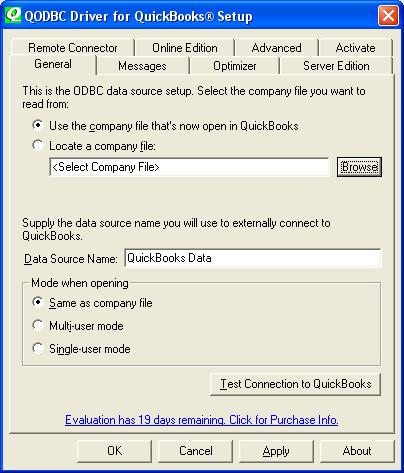
Is the iBiz Remote Connector running in your System tray? If yes, try setting QODBC back "Use the company file that's open in QuickBooks". Make sure QuickBooks and the company file is open and try connecting using the remote connector using VB Demo again.
Note: You must do this on the computer that has QuickBooks on it.
|
|
|
|
|
|
| Posted : 2007-08-15 05:34:18 |
Ok, I have done everything you asked.... it's been that way all along because I read the FAQ. Now, I have removed the Sample start version of QB and installed a real version of QB Pro 2007. SAME PROBLEM. I can not buy this product if I don't get this working! Please tell me something to check that is not already in the FAQ? I am using the sample database within QB (sample_product-based business.qbw) could that be a problem? The password on that file is blank. |
|
|
|