| Having Problem With ASP Code? |
| Author |
Message |
|
|
| Posted : 2007-06-01 07:16:40 |
Ok, I got this working fine just the other day, and it worked 100% great. All that happened was I reboot the computer and now nothing is working.
Even when I re-downloaded the test asp page, and I goto the url, it just freezes, and even left for minutes does nothing. |
|
|
|
| Tom |
 |
| Group | : Administrator |
| Posts | : 5510 |
| Joined | : 2006-02-17 |
|
| Profile |
|
| Posted : 2007-06-01 08:17:53 |
|
|
|
|
|
| Posted : 2007-06-01 22:40:29 |
I appreciate your canned response but as I said, I already have been working on this for a few days to show my work what can be done with a web app and it was working fine. I just re-followed the directions step by step and it freezes like it did before. shows this on step "Sample ASP file"
QODBC Customer Web List Demo Page
Preparing to Create Connection Object
ADO Connection Created
ADO Recordset Created - Opening QuickBooks Sample Company File
and never moves from there, yet on qodbc if I hit test connection it says successful.
|
|
|
|
| Tom |
| |
| Group | : Administrator |
| Posts | : 5510 |
| Joined | : 2006-02-17 |
|
| Profile |
|
| Posted : 2007-06-02 11:08:12 |
|
|
|
|
|
| Posted : 2007-06-05 00:53:53 |
| I tried that as well, still it isnt working with IIS. Any other ideas? |
|
|
|
| Tom |
| |
| Group | : Administrator |
| Posts | : 5510 |
| Joined | : 2006-02-17 |
|
| Profile |
|
| Posted : 2007-06-05 08:09:20 |
|
|
|
|
|
| Posted : 2007-06-06 01:25:28 |
| When following the steps in the second link, after opening the Dcom config, I got errors stating that there were entires under the computer and not this user, so I imported the information, the machine is rebooting now and I am going to do some testing, I will report back. |
|
|
|
|
|
| Posted : 2007-06-06 01:31:46 |
same problem...
QODBC Customer Web List Demo Page
Preparing to Create Connection Object
ADO Connection Created
ADO Recordset Created - Opening QuickBooks Sample Company File
freezes there never changes. |
|
|
|
| Tom |
| |
| Group | : Administrator |
| Posts | : 5510 |
| Joined | : 2006-02-17 |
|
| Profile |
|
| Posted : 2007-06-06 08:24:03 |
| Please redo the setup logged in as the system administrator and not a user account. |
|
|
|
|
|
| Posted : 2007-06-08 02:20:38 |
after following those directions the dcom test says
QODBC ASP DCOM Access Test Page
| QB2002 | QB2003 | QB2004 | DCOM | COM | Object Name | Status |
| • |
• |
|
• |
|
QBXMLRPEQODBCInteractive.exe |
Error: |
| • |
• |
|
|
• |
QBXMLRP.dll |
Success |
| |
|
• |
• |
|
QBXMLRP2EQODBCInteractive.exe |
Error: |
| |
|
• |
|
• |
QBXMLRP2.dll |
Success |
| • |
• |
• |
|
• |
XERCES-COM.dll |
Error: ActiveX component can't create object |
Current Logged on User is:
Authenticated user is:
|
|
|
|
|
| Tom |
| |
| Group | : Administrator |
| Posts | : 5510 |
| Joined | : 2006-02-17 |
|
| Profile |
|
| Posted : 2007-06-08 08:17:18 |
Please give read and write rights to the QuickBooks application folder (normally C:\Program Files\QODBC Driver for QuickBooks\) to the Anonymous web user IUSR_, ASPNET user and INTERACTIVE. This allows allows access to the DCOM server executables. And rerun the Automatic DCOM confuguration and reboot the computer.
Automatic DCOM Configuration
Click here: qodbcSetDCOM.zip to download the following automated tools:-
 |
Dcpinst.exe is an installation setup for the automated DCOM configuration object. This needs to be run first and only once. |
|
QODBCSetDCOM.VBS is a VB script that uses the installed configuration object to setup the DCOM Servers. It will reset and automatically add all necessary security each time it is run. The script can be edited if you need to change the Accounts it is configuring. |
|
The new settings will not take affect until the DCOM servers (qbXMLRPeQODBCInteractive.exe and qbXMLRP2eQODBCInteractive.exe) are removed from memory. Rebooting is the simplest way to accomplish this, but running the Windows Task Manager and Ending Process on any running copies will also work. |
|
Test your DCOM setup using one of the following:-
|

|
|
|
|
|
|
| Posted : 2007-06-08 23:13:48 |
Ok, I must be doing something wrong. I took screen shots of each step though and still it doesnt work.
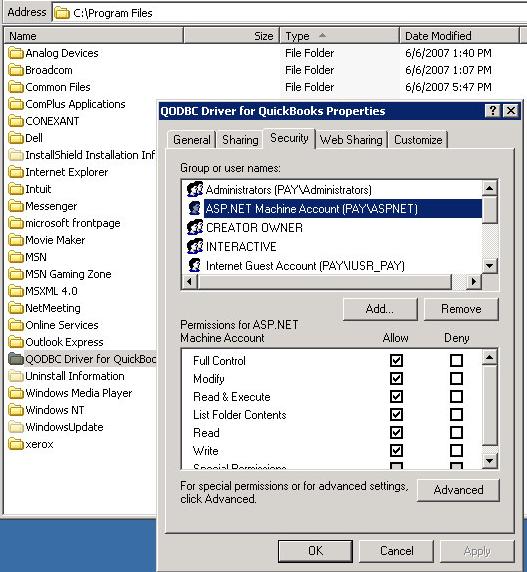
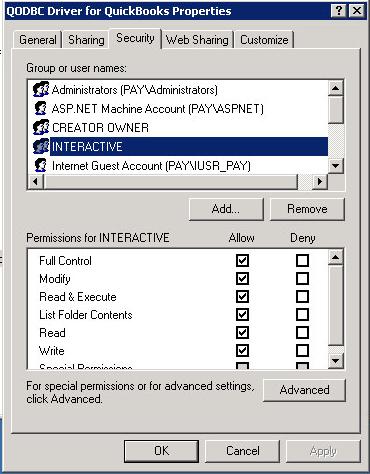
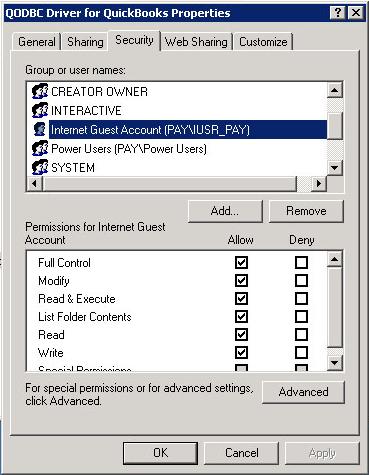
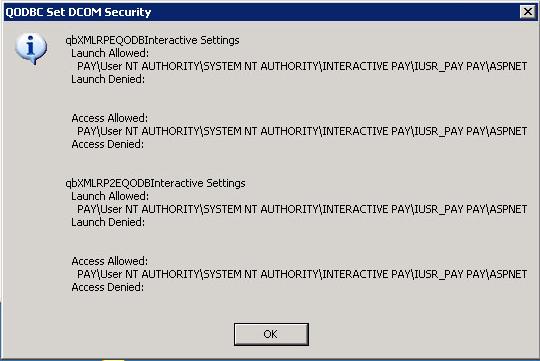
and testdcom.asp still shows ..
QODBC ASP DCOM Access Test Page
| QB2002 | QB2003 | QB2004 | DCOM | COM | Object Name | Status |
| • |
• |
|
• |
|
QBXMLRPEQODBCInteractive.exe |
Error: |
| • |
• |
|
|
• |
QBXMLRP.dll |
Success |
| |
|
• |
• |
|
QBXMLRP2EQODBCInteractive.exe |
Error: |
| |
|
• |
|
• |
QBXMLRP2.dll |
Success |
| • |
• |
• |
|
• |
XERCES-COM.dll |
Error: ActiveX component can't create object |
Current Logged on User is:
Authenticated user is:
|
|
|
|
|
| Tom |
| |
| Group | : Administrator |
| Posts | : 5510 |
| Joined | : 2006-02-17 |
|
| Profile |
|
| Posted : 2007-06-09 10:14:32 |
|
|
|
|
|
| Posted : 2007-06-12 06:07:52 |
| Neither of those ideas helped me but I did find the problem and fix it so it is working. |
|
|
|

