|

Buy Support
Incidents |
|
If you can't find your answer
in the FREE PUBLIC QDeveloper Forum, require URGENT Priority Support, or you need to send us
private or confidential information: |
|
Click Here
|
If you can't
login and post questions or you are having trouble viewing forum posts:
Click Here
|
Callback
Support |
|
If you live in USA, UK, Canada, Australia or New
Zealand, you can leave us details on your question and request us to call you back and discuss
them with you personally (charges apply). |
|
Click Here
|
Buy Support
Incidents |
|
If you can't find your answer
in the FREE PUBLIC QDeveloper Forum, require URGENT Priority Support, or you need to send us
private or confidential information: |
|
Click Here
|
|
| Inserting a new customer through Access 07 |
| Author |
Message |
|
|
| Posted : 2007-08-05 11:58:16 |
OK - apparently I am an idiot.
I have a database in Access 07 with a Client table for a lawyer's office. They want to be able to enter a client in Access and have them created in QB 07 as well. I am able to connect to the customer table in QB just fine. But when I try to enter data into the QB file, either manually or with a query or with an SQL statement, I get an error of:
ODBC--insert on linked table 'Customer' failed.
[QODBC] Field not allowed in insert. (#10046)
What am I missing? Help! |
|
|
|
| Tom |
 |
| Group | : Administrator |
| Posts | : 5510 |
| Joined | : 2006-02-17 |
|
| Profile |
|
| Posted : 2007-08-05 16:50:25 |
|
|
|
|
|
| Posted : 2007-08-05 16:54:07 |
| I have read that post several times, but I am still missing something. I was starting small so all I was trying to insert was Company Name, First Name, Last Name and State. I still get the same error message |
|
|
|
| Tom |
| |
| Group | : Administrator |
| Posts | : 5510 |
| Joined | : 2006-02-17 |
|
| Profile |
|
| Posted : 2007-08-05 21:28:51 |
If you run:
sp_columns Customer
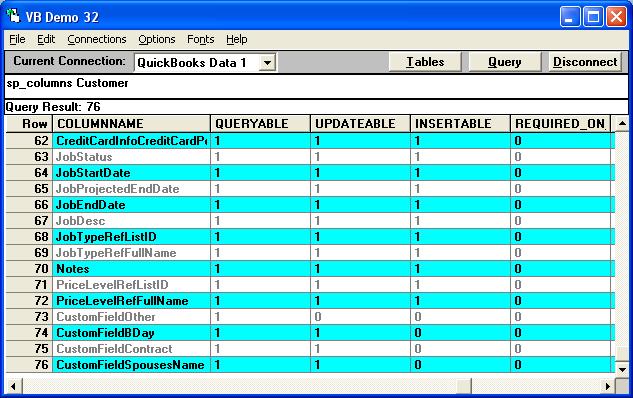
you would have seen that Customer.Name is a required on insert unique field for any new customer record. |
|
|
|
|