|

Buy Support
Incidents |
|
If you can't find your answer
in the FREE PUBLIC QDeveloper Forum, require URGENT Priority Support, or you need to send us
private or confidential information: |
|
Click Here
|
If you can't
login and post questions or you are having trouble viewing forum posts:
Click Here
|
Callback
Support |
|
If you live in USA, UK, Canada, Australia or New
Zealand, you can leave us details on your question and request us to call you back and discuss
them with you personally (charges apply). |
|
Click Here
|
Buy Support
Incidents |
|
If you can't find your answer
in the FREE PUBLIC QDeveloper Forum, require URGENT Priority Support, or you need to send us
private or confidential information: |
|
Click Here
|
|
| How do I grant read/write access? (getting error 3263) |
| Author |
Message |
| TomW |
| |
| Group | : Members |
| Posts | : 24 |
| Joined | : 2007-04-03 |
|
| Profile |
|
| Posted : 2007-05-02 09:30:11 |
I have the following sql
WriteOrderToQB_SQL = "INSERT INTO InvoiceLine(CustomerRefFullName," _
& "InvoiceLineItemRefFullName, InvoiceLineDesc, Invoice" _
& "LineQuantity, InvoiceLineRate, FQSaveToCache )" _
& "Values('" & Customer & "', '" & Item & "', '" & Description & "', '" _
& Quantity & "', '" & Price & "',0)"
DoCmd.RunSQL WriteOrderToQB_SQL
I get this error...
[QODBC] Error: 3263 - This request cannot be completed because the integrated application had requested read-only access. Have the integrated application request read/write access, and have the QuickBooks administrator grant this access. (#10053)
I just activated Read/Write QODBC the other day, do I need to delete the previously existing optimizer file in
C:\Program Files\Intuit\QuickBooks Enterprise Solutions 7.0\Components\QODBC\Optimizer???
Thanks
|
|
|
|
| Tom |
 |
| Group | : Administrator |
| Posts | : 5510 |
| Joined | : 2006-02-17 |
|
| Profile |
|
| Posted : 2007-05-02 11:56:42 |
Check that: Read-Only Access is not checked.
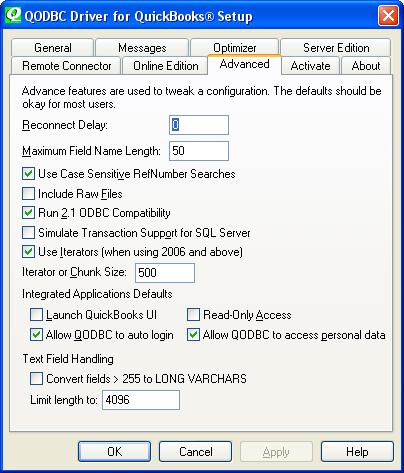
If you have been using the QODBC Enterprise Edition that's part of US QuickBooks Enterprise 2006 and 2007, you need to upgrade all copies of QODBC to the full read-write version of QODBC, not just one of the workstations. |
|
|
|
| TomW |
| |
| Group | : Members |
| Posts | : 24 |
| Joined | : 2007-04-03 |
|
| Profile |
|
| Posted : 2007-05-02 12:13:46 |
I have tried unchecking the 'Read-Only Access' box several times, as soon as I close the setup window and reopen it ... it is checked again.
Yes I am US QBE 7. I have v 7.00.00.214 of QODBC and R7 QBE maintenance update, (I am current in these)
. But this QBE install is at my house (the only installation here). I bought 2 licenses, one is for the office, the other here. I do a lot of the development work here (on copies of company data).
Are you saying I will have to buy one for all the workstations at the office? Even if only a couple workstations will be using the software? I was going to buy a couple more so that there would be 3 workstations with read/write but you say I need it on every one?
Aside from that question... here at my house I only have one. Why would that one not work?
Thanks for all your help Mr. Tom, you are great! |
|
|
|
| Tom |
| |
| Group | : Administrator |
| Posts | : 5510 |
| Joined | : 2006-02-17 |
|
| Profile |
|
| Posted : 2007-05-02 12:34:51 |
The free version of QODBC that comes with QuickBooks Enterprise 2006 and 2007 (USA Editions only) is hard coded as required by Intuit to force the intergrated application (FLEXquarters QODBC) to be read-only in the company file. So if you use the free version with the company file, it will be forced read-only.
Open the company file, select "Edit/Preferences/Integrated applications... " and remove all "Flexquarters QODBC" records. Then with your read-write version of QODBC do the: How do I connect to QuickBooks for the first time? all over again. |
|
|
|
|
|
| Posted : 2007-07-11 07:42:17 |
| That so does not work. Ive removed all the Flex Quaters references, even deinstalled and reinstalled Quickbooks and the ODBC driver and it still has the same ***damn prompt!! How do I get rid of it!! |
|
|
|
| Tom |
| |
| Group | : Administrator |
| Posts | : 5510 |
| Joined | : 2006-02-17 |
|
| Profile |
|
| Posted : 2007-07-11 08:11:17 |
| To write to QuickBooks requires that you have installed the full version of QODBC and purchased and activated a read/write license CD Key. |
|
|
|
|