|

Buy Support
Incidents |
|
If you can't find your answer
in the FREE PUBLIC QDeveloper Forum, require URGENT Priority Support, or you need to send us
private or confidential information: |
|
Click Here
|
If you can't
login and post questions or you are having trouble viewing forum posts:
Click Here
|
Callback
Support |
|
If you live in USA, UK, Canada, Australia or New
Zealand, you can leave us details on your question and request us to call you back and discuss
them with you personally (charges apply). |
|
Click Here
|
Buy Support
Incidents |
|
If you can't find your answer
in the FREE PUBLIC QDeveloper Forum, require URGENT Priority Support, or you need to send us
private or confidential information: |
|
Click Here
|
|
| TxnDeleted |
| Author |
Message |
|
|
| Posted : 2007-09-13 13:45:28 |
I read from on of your posting regarding TxnDeleted Table - "TXNDELETED table only holds info for the last 90 days only and you need to update to 7.1.0.231 "
I am using the Quickbook US version premiere 2005 and I upgraded QODBC to the latest version 7.10.00.231.
I still don't get any rows from 'Select * from TxnDeleted UNOPTIMIZED query using Access.
Can you show us samples on how to properly retrieve data from this table? or any other way to retrieve deleted transaction by other method using QODBC?
Thanks again.
|
|
|
|
| Tom |
 |
| Group | : Administrator |
| Posts | : 5510 |
| Joined | : 2006-02-17 |
|
| Profile |
|
| Posted : 2007-09-13 15:16:55 |
I think you should consider upgrading to QuickBooks 2007 (or 2008):
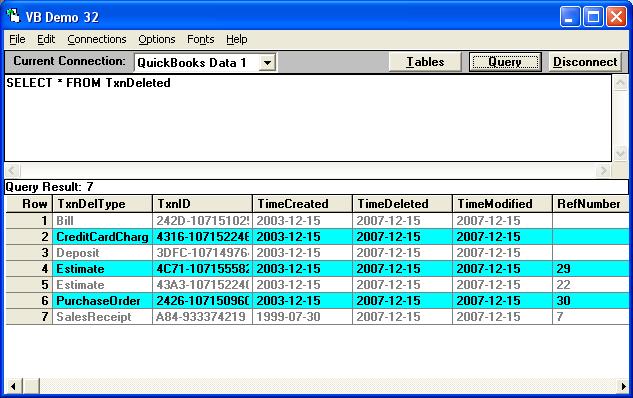
|
|
|
|
|
|
| Posted : 2007-09-14 11:37:55 |
My QODBC licence is good for Quickbook 2006 and below . Upgrading Quickbook premiere to the more recent version will also mean upgrading my QODBC license which will be quite expensive to do all at the same time. :(
Any other option? |
|
|
|
|
|
| Posted : 2007-09-14 12:58:09 |
At present, My solution is to extract the voided/deleted transaction by generating Quickbook report under "Accountant & Taxes => Voided/Deleted Transactions" report , export it to Excel file, then import the excel file.
Is there a way for me to use QODBC SP_Report method to generate the same report as above ?
Thanks again.
|
|
|
|
| Tom |
| |
| Group | : Administrator |
| Posts | : 5510 |
| Joined | : 2006-02-17 |
|
| Profile |
|
| Posted : 2007-09-14 12:58:17 |
| The TxnDeleted table can also be seen using QuickBooks 2006 (USA version). |
|
|
|
|