|

Buy Support
Incidents |
|
If you can't find your answer
in the FREE PUBLIC QDeveloper Forum, require URGENT Priority Support, or you need to send us
private or confidential information: |
|
Click Here
|
If you can't
login and post questions or you are having trouble viewing forum posts:
Click Here
|
Callback
Support |
|
If you live in USA, UK, Canada, Australia or New
Zealand, you can leave us details on your question and request us to call you back and discuss
them with you personally (charges apply). |
|
Click Here
|
Buy Support
Incidents |
|
If you can't find your answer
in the FREE PUBLIC QDeveloper Forum, require URGENT Priority Support, or you need to send us
private or confidential information: |
|
Click Here
|
|
| VBDemo hanging |
| Author |
Message |
| MP |
| |
| Group | : Members |
| Posts | : 4 |
| Joined | : 2007-01-11 |
|
| Profile |
|
| Posted : 2007-09-02 04:49:06 |
I have tried many different configurations with QODBC and nothing seems to make a difference. Here is what happens. If I run vbdemo wnd run "Select * from invoice where refnumber='H 3060'" the query comes back withina couple of seconds, great. If I run "Select refnumber from invoice where shipdate ={d '2007-09-07'}" VBDemo and Quickbooks stop responding. If I try to test the connection from the QODBC configure window I get a message that just says for a list of error codes and possible solutions click here. No error code, or anything. However, using the same DSN in vbdemo yields a connection and sometimes a query will work, sometimes not. I am at wits end.
I am interfacing with an asp.net application to view a delivery schedule and invoice information, written in VB.
I have reinstalled QB, and QODBC, checked DCom settings several times, restarted IIS, and the server. Nothing is producing results. VBDemo still hangs, and QB stops responding.
Any insight into this problem would be helpful. I am using QB 2007 Pro, and QODBC 7.10.00.231
A little side note. We have been using this with QB 2005 and QODBC 6.x with great success. Tried to upgrade QB and QODBC and all went down the toilet.
|
|
|
|
| Tom |
 |
| Group | : Administrator |
| Posts | : 5510 |
| Joined | : 2006-02-17 |
|
| Profile |
|
| Posted : 2007-09-02 21:28:52 |
Most likely you are using VB Demo and/or your ASP.NET application at the same time. The QODBC optimizer is single user only so you need to setup a different optimizer file for your ASP.NET application to use than the other desktops applications. To do this step up a seperate System DSN (see: How do I create or configure a QODBC DSN? ) and specify a fixed location of the optimizer database folder for your ASP.NET application to use instead of the default UserProfile method. A directory would be: C:\Program Files\QODBC Driver for QuickBooks\
Don't forget to also give read and write rights to the QuickBooks application folder (normally C:\Program Files\QODBC Driver for QuickBooks\) to the Anonymous web user IUSR_, ASPNET user and INTERACTIVE.
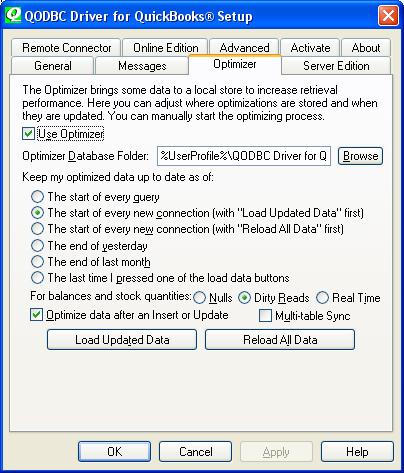
A force a re-optimization of the Invoice table do:
SELECT TxnID FROM Invoice VERIFY where TxnID = 'x' |
|
|
|
| MP |
| |
| Group | : Members |
| Posts | : 4 |
| Joined | : 2007-01-11 |
|
| Profile |
|
| Posted : 2007-09-03 02:31:02 |
The asp.net application is currently not being used as it is not working properly. So the only application I was running was vbdemo. I had created several various dsn connections, and here is another little oddity. If I use the options for current file open, and same settings as the file, I get a connection. However, if I specify a file to connect to I get an error. Not sure what that is about either.
I will check the user permissions again, but I have checked them multiple times and all appears in order. |
|
|
|
| Tom |
| |
| Group | : Administrator |
| Posts | : 5510 |
| Joined | : 2006-02-17 |
|
| Profile |
|
| Posted : 2007-09-03 08:33:39 |
|
|
|
|