| Reinstall on new computer |
| Author |
Message |
|
|
| Posted : 2007-09-18 13:05:43 |
| I purchased a new computer and installed QODBC on the new system. I put in the old keycode which seemed to activate the driver. However; I can no longer write to my Quickbooks file, and I purchased the read/write version. What do I do to get write access granted again? |
|
|
|
| Tom |
 |
| Group | : Administrator |
| Posts | : 5510 |
| Joined | : 2006-02-17 |
|
| Profile |
|
| Posted : 2007-09-18 15:35:48 |
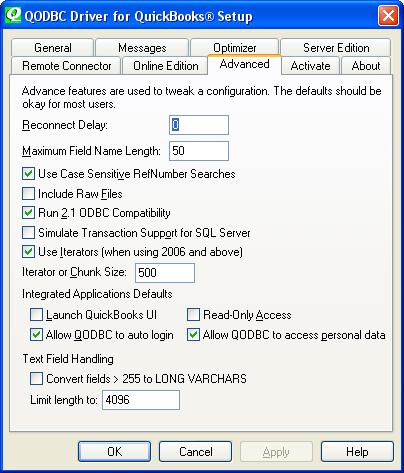
Please check the actual status of your QODBC license in the "About" tab in the QODBC Setup screen and then make sure you haven't selected Read-Only Access.
|
|
|
|
|
|
| Posted : 2007-09-18 23:47:41 |
Read only access is not checked, on the advanced tab. On the about tab, the product appears to be licensed just fine.
Sally |
|
|
|
| Tom |
| |
| Group | : Administrator |
| Posts | : 5510 |
| Joined | : 2006-02-17 |
|
| Profile |
|
| Posted : 2007-09-19 08:40:08 |
| Try using VB Demo to process the insert statement instead of your application and advise what the error (if any) actually is? |
|
|
|
|
|
| Posted : 2007-09-19 10:45:18 |
Pardon my ignorance, but I'm not used to working in VB. I can open the demo and make the connection, but am not sure of the syntax to do as you ask. However; I did notice that I am actually able to modify (write). It's just that I can't see the changes when they are made. When I move onto the next record, my application appears to have dumped my changes and reverted. However, after closing the table and reopening, the changes are indeed there. It used to refresh my screen and keep the changes. Could I have an improper setting that's causing the screen to not refresh properly? By the way - the application I'm using is Access.
Sally |
|
|
|
| Tom |
| |
| Group | : Administrator |
| Posts | : 5510 |
| Joined | : 2006-02-17 |
|
| Profile |
|
| Posted : 2007-09-19 11:50:15 |
You need check the "Optimize data after an Insert or Update" option in the Optimizer Tab of the QODBC Setup Screen. This causes QODBC to do "Load Updated Data" after your insert or update is executed on a table. Useful for programmers who want to test that their data has succesfully been written to QuickBooks.
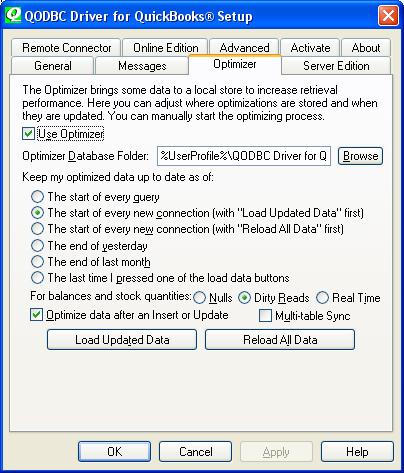
See: How do I setup the QODBC Optimizer? Where are the Optimizer options? for more. |
|
|
|
|
|
| Posted : 2007-09-19 11:59:44 |
Thank you so much. That does indeed work.
However, I don't remember having to do this before, or to see the little pop up saying that the data was being optimized. Seems I used to just be able to change the data, move to the next record, and see my changes without that rigmarole....am I dreaming this? Or does it have something to do with Vista? Hmmmm...maybe it has to do with a setting in Access. I'm confused as to why it's different anyway. Any insights? |
|
|
|
| Tom |
| |
| Group | : Administrator |
| Posts | : 5510 |
| Joined | : 2006-02-17 |
|
| Profile |
|
| Posted : 2007-09-19 13:51:35 |
| The QODBC Optimzer options have changed. You would have downloaded a newer version of QODBC to use with MS Windows Vista. |
|
|
|
|
|
| Posted : 2007-09-20 00:12:07 |
Ah. That makes sense. Thanks again for your help.
Sally |
|
|
|
