|

Buy Support
Incidents |
|
If you can't find your answer
in the FREE PUBLIC QDeveloper Forum, require URGENT Priority Support, or you need to send us
private or confidential information: |
|
Click Here
|
If you can't
login and post questions or you are having trouble viewing forum posts:
Click Here
|
Callback
Support |
|
If you live in USA, UK, Canada, Australia or New
Zealand, you can leave us details on your question and request us to call you back and discuss
them with you personally (charges apply). |
|
Click Here
|
Buy Support
Incidents |
|
If you can't find your answer
in the FREE PUBLIC QDeveloper Forum, require URGENT Priority Support, or you need to send us
private or confidential information: |
|
Click Here
|
|
| [QODBC] Invalid operand for operator: <assignment> |
| Author |
Message |
|
|
| Posted : 2007-05-16 08:09:42 |
Through VB Demo I use the following insert statement:
insert into InvoiceLine( CustomerRefFullName,TxnDate,IsToBePrinted,InvoiceLineItemRefFullName,InvoiceLineDesc,InvoiceLineRate,InvoiceLineClassRefFullName) values ('Barbuto, John','2007-05-01',0,'Inspection','Inspection For John Barbuto @ Address., City, STATE',65,'Inspection')
And I get this error:
[QODBC] Invalid operand for operator: <assignment>
What is causing this? |
|
|
|
| Tom |
 |
| Group | : Administrator |
| Posts | : 5510 |
| Joined | : 2006-02-17 |
|
| Profile |
|
| Posted : 2007-05-17 01:31:44 |
Let's see, for starters, the date format is incorrect, should be:
insert into InvoiceLine( CustomerRefFullName,TxnDate,IsToBePrinted,InvoiceLineItemRefFullName,InvoiceLineDesc,InvoiceLineRate,InvoiceLineClassRefFullName) values ('Barbuto, John',{d'2007-05-01'},0,'Inspection','Inspection For John Barbuto @ Address., City, STATE',65,'Inspection')
To create a invoice you just need three things:
1: The name of the customer you what to invoice (from the Customer table);
2: The name of the part or service to invoice (from the Item table);
3: The name of the sales tax code to use (from the SalesTaxCode table).
Providing all these things already exist in your QuickBooks company file, you don't need to read anything out of QuickBooks. You simply do one insert statement using the three things above. For example:
INSERT INTO "InvoiceLine" ("CustomerRefFullName", "RefNumber",
"InvoiceLineItemRefFullname", "InvoiceLineDesc", "InvoiceLineRate",
"InvoiceLineAmount", "InvoiceLineSalesTaxCodeRefFullName", "FQSaveToCache")
VALUES ('Data Access Worldwide', 'QODBCINV1', 'Repairs', 'Repair NoteBook Computer',
200.00000, 200.00, 'NON', 0)
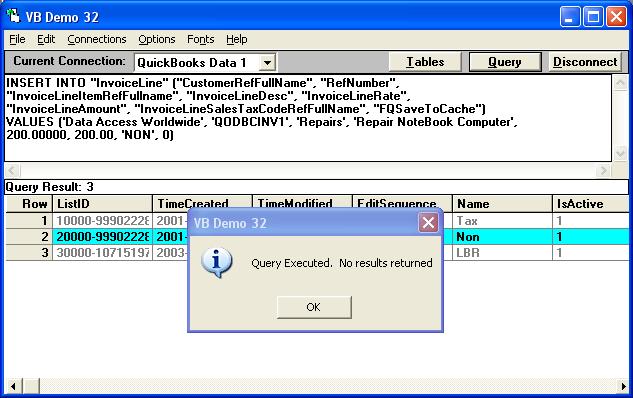
In MS Access this can also be run using DoCmd.RunSQL:
DoCmd.RunSQL "INSERT INTO InvoiceLine (CustomerRefFullName, RefNumber, " & _
"InvoiceLineItemRefFullname, InvoiceLineDesc, InvoiceLineRate, " & _
"InvoiceLineAmount, InvoiceLineSalesTaxCodeRefFullName, FQSaveToCache)" & _
"VALUES ('My.CustomerRefFullName', 'My.RefNumber', " & _
"'My.InvoiceLineItemRefFullname', 'My.InvoiceLineDesc', 'My.InvoiceLineRate', " & _
"'My.InvoiceLineAmount', 'My.InvoiceLineSalesTaxCodeRefFullName', 0)"
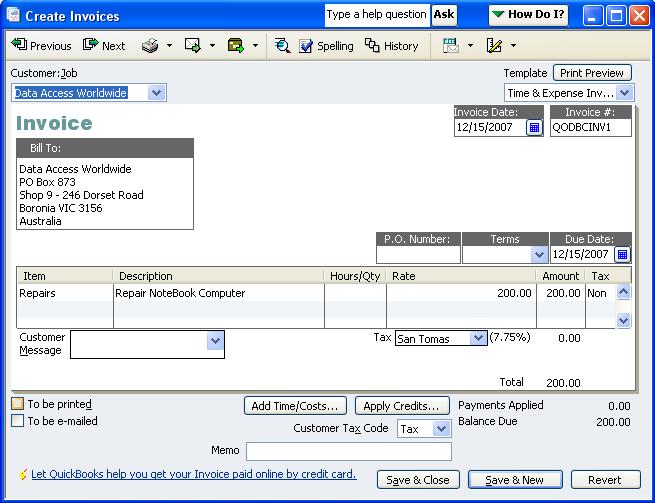
and the following invoice was created in QuickBooks with all the customer details "auto-populated":
|
|
|
|
|
|
| Posted : 2007-08-09 22:13:10 |
I have been receiving this error everytime I try to insert an Invoice. My invoiceLine records are going into the system with (seemingly) no problem. I stripped the query down to what seemed to be the only required fields and am still receiving this error...any ideas? Also, I am using FQSaveToCache in my InvoiceLine query, is there something I need to put into the Invoice Query?
Here is my Query: INSERT INTO Invoice (CustomerRefListId, CustomerRefFullName)VALUES(3,'TEST CUSTOMER')
Here is the Original Query:
INSERT INTO Invoice (CustomerRefListId,CustomerRefFullName, Billaddressaddr1,Billaddressaddr2,Billaddressaddr3, Billaddresscity, Billaddressstate, Billaddresspostalcode)VALUES(3,'TEST CUSTOMER','111 N ','','','','SOMEPLACE','NJ','08000')
Any help would be appreciated. |
|
|
|
| Tom |
| |
| Group | : Administrator |
| Posts | : 5510 |
| Joined | : 2006-02-17 |
|
| Profile |
|
| Posted : 2007-08-09 23:08:01 |
When using FQSaveToCache, errors in the InvoiceLine inserts are not seen until the Invoice header is inserted. So your error could be related to a InvoiceLine insert.
Your original query has 8 columns but you have 9 values. If the number of columns and number of values are mismatched, you will get a [QODBC] Invalid operand for operator: <assignment> error.
BTW: Use either CustomerRefListId or CustomerRefFullName, but not both. This is a QuickBooks Online Edition example:
INSERT INTO InvoiceLine (InvoiceLineItemRefListID, InvoiceLineDesc, InvoiceLineRate,
InvoiceLineAmount, FQSaveToCache)
VALUES ('2', 'THIS IS A TEST BY TOM, 100.00000, 100.00, 1)
INSERT INTO Invoice (CustomerRefListID, TxnDate, RefNumber, DueDate)
VALUES ('2', {d'2006-05-01'}, 'TestRefNum_1', {d'2006-06-01'})
|
|
|
|
|