| QODBC hangs in SQL Server 2000 server link |
| Author |
Message |
|
|
| Posted : 2007-04-10 06:24:56 |
Hi,
Hope someone here can help with this...
No matter what I do, I can't get a QODBC linked server or DTS package to execute against my company file.
All options are set as in the FAQs here, which I've read several times. I've tried tweaking the advanced options in the setup screen, pretty much like the guy in this thread.
Only difference is, I can't get a query to complete, at all. It works fine through the VB Demo, but the same data source fails completely in SQL Server 8.0 SP3. Just hangs. And I can't even cancel the query, as that hangs too--I have to close the window and force SQL to shut it down.
Also, the optimizer took about 2-3 hours the first time through, but now when running against the same file, unchanged, it takes almost 1 hour. Seems very, very slow to me--don't know if it's related.
Running QB Pro 2006 US and the latest QODBC, in DCOM mode (DCOM passes). Company file around 90 MB. Your assistance is much appreciated. |
|
|
|
| Tom |
 |
| Group | : Administrator |
| Posts | : 5510 |
| Joined | : 2006-02-17 |
|
| Profile |
|
| Posted : 2007-04-10 08:20:16 |
|
|
|
|
|
| Posted : 2007-04-10 23:57:48 |
| Thanks for the reply. I've followed those instructions expressly, to no avail. But given that even an ad-hoc query in SQL hangs, something else must be going on--I don't think the DTS is the problem, but rather the SQL inside the DTS tasks.
The endless optimizing may be a separate problem. How long should it take the optimizer to "know" that the qb db has not changed? |
|
|
|
| Tom |
| |
| Group | : Administrator |
| Posts | : 5510 |
| Joined | : 2006-02-17 |
|
| Profile |
|
| Posted : 2007-04-11 08:17:52 |
|
|
|
|
|
| Posted : 2007-04-15 06:07:08 |
| Yes, I realize that--once a simple query works, so does the DTS. I've been able to get it to work on one machine using the sample file, so I actually think my problems have been caused by QuickBooks permissions, and not by your driver. |
|
|
|
|
|
| Posted : 2007-04-19 06:01:33 |
OK. So I've managed to get it to query, but only if QB is running, which is Problem #1.
But Problem #2 is that even though the query completes without errors, no data is returned. To recap my setup:
- SQL Server 2005 SP2
- SSMS 2005 running on same server
- QB Pro 2006 US
- Latest QODBC in DCOM mode (all DCOM tests pass)
This is how I created the Linked Server that worked:
EXEC sp_addlinkedserver @server = N'QODBC', @srvproduct=N'QODBC', @provider=N'MSDASQL', @datasrc=N'QuickBooks Data', @provstr = 'ODBC;DSN=QuickBooks Data;DFQ=
;SERVER=QODBC;UseDCOM=Y; OptimizerDBFolder=%UserProfile%\QODBC Driver for QuickBooks\Optimizer; OptimizerAllowDirtyReads=N'
This is the query that worked:
SELECT * FROM OPENQUERY(QODBC, 'SELECT ListID, Name FROM Customer NOSYNC')
This variation DOES NOT WORK:
SELECT ListID, Name FROM QODBC...Customer
returning the error message 'An invalid schema or catalog was specified for the provider "MSDASQL" for linked server "QODBC".' What is strange is that the VBDemo works. What is the difference in the way it negotiates permissions? Has QODBC been thoroughly tested with SQL 2005?
Also, why won't either the VBDemo or the SQL query work if QB is closed? All DCOM settings and QODBC settings are as specified in the above link, and permissions have been granted on the company file correctly. |
|
|
|
| Tom |
| |
| Group | : Administrator |
| Posts | : 5510 |
| Joined | : 2006-02-17 |
|
| Profile |
|
| Posted : 2007-04-19 11:09:29 |
|
|
|
|
|
| Posted : 2007-04-19 12:08:55 |
| I have used both the NOSYNC and the NOSYNCless version, neither returns records.
I have, of course, followed those login instructions explicitly. Both SQL Server 2005 and the VBDemo are approved in the company file, and the settings, as I mentioned in the last post, are correct in QODBC.
I'm trying to say that the problem I'm having is not addressed in any of your FAQ documents. |
|
|
|
| Tom |
| |
| Group | : Administrator |
| Posts | : 5510 |
| Joined | : 2006-02-17 |
|
| Profile |
|
| Posted : 2007-04-19 12:51:56 |
Does:
SELECT * FROM OPENQUERY(QODBC, 'SELECT * FROM Host')
return one rowset?
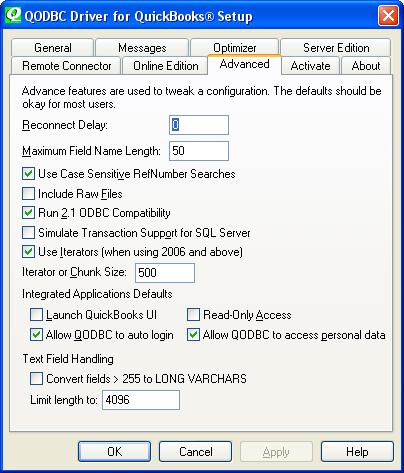
Note: You may need to check the "Run 2.1 ODBC Compatibility" checkbox - Certain applications require ODBC 2.1 Compatibility to use QODBC. For example, anything that uses the Java ODBC library, like ColdFusion, requires this option turned on or recordsets will be returned with no rowsets or only 1 rowset.
|
|
|
|
|
|
| Posted : 2007-04-19 13:19:35 |
| No, it returns no records. (No query I have run--and I have tried many--has returned records, though at least they're no longer failing...)
Run 2.1 ODBC Compatibility is checked.
|
|
|
|
| Tom |
| |
| Group | : Administrator |
| Posts | : 5510 |
| Joined | : 2006-02-17 |
|
| Profile |
|
| Posted : 2007-04-19 13:43:15 |
|
|
|
|
|
| Posted : 2007-04-19 14:00:36 |
| Didn't work.
First I tried just dropping the linked server and re-adding it. Didn't work.
So then I unchecked use DCOM server in QODBC, deleted all links from inside the company file to FLEXQuarters, checked use DCOM, relinked the server, relaunched the query--basically starting over. Got the prompt again in QB and said yes, all permissions, all sensitive data, etc.--and still got no records. |
|
|
|
| Tom |
| |
| Group | : Administrator |
| Posts | : 5510 |
| Joined | : 2006-02-17 |
|
| Profile |
|
| Posted : 2007-04-19 14:54:37 |
Try switching over to using the Rock Castle sample company file and see if that makes a difference. Check that VB Demo works and that rows are returned, and in the QODBC Setup Screen check the license status in "About" and if there are error messages in the QODBC and SDK log files in the "Messages" tab.
The DCOM method only works if you have a QODBC Server Evaluation or fully pruchased Server license, but it will work with any of the QuickBooks Sample Company files if you don't. |
|
|
|
|
|
| Posted : 2007-04-24 00:44:12 |
No, the Rock Castle file behaves identically--the query runs but returns no records in SQL Server (and will not run using the SELECT * FROM QODBC...Host syntax either), and runs correctly in the VBDemo. Here are the qbsdklog results for the SQL run and the VBDemo run, respectively:
-------------------------------- BEGIN LOG --------------------------------
SQL Server
20070423.103039 I 1276 QBSDKProcessRequest Application named 'FLEXquarters QODBC' starting requests (process 3584). 20070423.103039 I 1276 SpecVersion Current version of qbXML in use: 5.0
20070423.103039 I 1276 QBSDKMsgSetHandler QUERY: Host
20070423.103039 I 1276 QBSDKMsgSetHandler Request 1 completed successfully.
20070423.103039 I 1276 QBSDKMsgSetHandler QUERY: Company
20070423.103039 I 1276 QBSDKMsgSetHandler Request 2 completed successfully.
20070423.103039 I 1276 QBSDKMsgSetHandler QUERY: DataExtension Definition
20070423.103039 I 1276 QBSDKMsgSetHandler Request 3 completed successfully.
20070423.103039 I 1276 MsgSetHandler Finished.
20070423.103039 I 1276 QBSDKProcessRequest Application named 'FLEXquarters QODBC' finishing requests (process 3584), ret = 0.
20070423.103039 I 1276 QBSDKProcessRequest Application named 'FLEXquarters QODBC' starting requests (process 3584).
20070423.103040 I 1276 SpecVersion Current version of qbXML in use: 5.0 20070423.103040 I 1276 QBSDKMsgSetHandler QUERY: Host
20070423.103040 I 1276 QBSDKMsgSetHandler Request 1 completed successfully. 20070423.103040 I 1276 MsgSetHandler Finished.
20070423.103040 I 1276 QBSDKProcessRequest Application named 'FLEXquarters QODBC' finishing requests (process 3584), ret = 0.
VBDemo
20070423.103312 I 1916 QBSDKProcessRequest Application named 'FLEXquarters QODBC' starting requests (process 3628).
20070423.103313 I 1916 SpecVersion Current version of qbXML in use: 5.0
20070423.103313 I 1916 QBSDKMsgSetHandler QUERY: Host
20070423.103313 I 1916 QBSDKMsgSetHandler Request 1 completed successfully.
20070423.103313 I 1916 QBSDKMsgSetHandler QUERY: Company
20070423.103313 I 1916 QBSDKMsgSetHandler Request 2 completed successfully.
20070423.103313 I 1916 QBSDKMsgSetHandler QUERY: DataExtension Definition
20070423.103313 I 1916 QBSDKMsgSetHandler Request 3 completed successfully.
20070423.103313 I 1916 MsgSetHandler Finished.
20070423.103313 I 1916 QBSDKProcessRequest Application named 'FLEXquarters QODBC' finishing requests (process 3628), ret = 0.
20070423.103317 I 1916 QBSDKProcessRequest Application named 'FLEXquarters QODBC' starting requests (process 3628).
20070423.103317 I 1916 SpecVersion Current version of qbXML in use: 5.0 20070423.103317 I 1916 QBSDKMsgSetHandler QUERY: Host
20070423.103317 I 1916 QBSDKMsgSetHandler Request 1 completed successfully. 20070423.103317 I 1916 MsgSetHandler Finished.
20070423.103317 I 1916 QBSDKProcessRequest Application named 'FLEXquarters QODBC' finishing requests (process 3628), ret = 0.
-------------------------------- END LOG --------------------------------
Looks identical to me. So it's got to be a QODBC problem. Once again, I am using:
- QODBC 7.0.0.214 evaluation (in server mode)
- Latest QB SDK (installing this fixed the access-while-company-file-closed problem, btw)
- Latest QBXML
- QB Pro 2006 US, all updates installed
- SQL Server 2005 SP2
|
|
|
|
| Tom |
| |
| Group | : Administrator |
| Posts | : 5510 |
| Joined | : 2006-02-17 |
|
| Profile |
|
| Posted : 2007-04-24 08:37:48 |
We would need to see a trace file to really see what's happening here.
Please run:
SELECT * FROM OPENQUERY(QODBC, 'SELECT * FROM Host')
SELECT * FROM OPENQUERY(QODBC, 'SELECT ListID, Name FROM Customer')
via SQL Server and
SELECT * FROM HOST
SELECT ListID, Name FROM Customer
in VB Demo, then zip it up and send the trace file to: qdeveloper@qdeveloper.com.au
See: How do I turn on the trace log? |
|
|
|
|
|
| Posted : 2007-04-24 08:56:20 |
| Done.
Worth mentioning in the context of this thread that the optimizer did not invoke in SQL Server, but did in the VB Demo. |
|
|
|
| Tom |
| |
| Group | : Administrator |
| Posts | : 5510 |
| Joined | : 2006-02-17 |
|
| Profile |
|
| Posted : 2007-04-24 09:53:10 |
| I've looked at the trace file and see that there were six connections, two to C:\trafqb\trfqb.QBW and four to the sample file: C:\trafqb\smplProd1.qbw. The trace clearly shows data being returned by QODBC to all the connections and queries. |
|
|
|
|
|
| Posted : 2007-04-24 12:54:37 |
| I think those first two are from a previous attempt at turning on the trace. That's the test company file you're talking about
Otherwise, I'd be thrilled with your reply, except the bottom line remains that I'm not getting any data in SQL Server.
So what is my next step? Until I *see* data I have to believe that QODBC is at fault. Can you help me read the trace at all? Or anything else? And what about the optimizer not invoking in the one case (SQL), but doing so in the other (VB Demo, which also happens to display data)? There's got to be something more here. |
|
|
|
| Tom |
| |
| Group | : Administrator |
| Posts | : 5510 |
| Joined | : 2006-02-17 |
|
| Profile |
|
| Posted : 2007-04-24 21:14:07 |
Using the sample file, what happens if you do?:
SELECT * FROM OPENQUERY(QODBC, 'SELECT ListID, Name FROM Customer unoptimized')
I know you like your stored procedure:
EXEC sp_addlinkedserver @server = N'QODBC', @srvproduct=N'QODBC', @provider=N'MSDASQL', @datasrc=N'QuickBooks Data', @provstr = 'ODBC;DSN=QuickBooks Data;DFQ=
;SERVER=QODBC;UseDCOM=Y; OptimizerDBFolder=%UserProfile%\QODBC Driver for QuickBooks\Optimizer; OptimizerAllowDirtyReads=N'
but can you please manually link QODBC as per: Does QODBC work with MS SQL Server Linked Tables? |
|
|
|
|
|
| Posted : 2007-04-25 14:44:41 |
| AHA! The unoptimized keyword WORKS! So what does this mean?
And is there an explanation for why the QODBC...Table call produces an error?
I can't manually link according to your instructions because the setup has changed entirely in 2005--those are 2000 instructions--but I have made sure that all the appropriate provider options are set. It doesn't matter.
|
|
|
|
| Tom |
| |
| Group | : Administrator |
| Posts | : 5510 |
| Joined | : 2006-02-17 |
|
| Profile |
|
| Posted : 2007-04-25 16:12:31 |
|
|
|
|
|
| Posted : 2007-04-26 02:17:06 |
| You are correct, I switched versions mid-thread. (I noted it, but didn't call enough attention to it.) I knew 2005 better, so figured I could troubleshoot there best.
Not using the optimizer isn't really a solution if it is the optimizer that makes your product so worthwhile--and significantly improves query speed--so I would prefer to find a solution to this. Esp. as it's now clearly identifiable as a QODBC glitch.
Once the optimizer is switched off, SQL queries mostly run fine without the unoptimized keyword. Not if I toggle Use Optimizer, however--sometimes I can no longer get results. (With the server linked manually per your instructions, I was ONLY able to get data using the keyword. The stored-proc version usually works without it.)
So to sum up, having run numerous iterations, it appears that:
- If the optimizer is never invoked at all, queries return data without incident.
- Once the optimizer is invoked, no data is returned until the unoptimized keyword is used again once, at which point queries may or may not work without the keyword.
BTW the QODBC...Table syntax is now working, I think this was probably tied to an incorrect Provider setting? Is there a way to use the unoptimized keyword in that syntax? |
|
|
|
| Tom |
| |
| Group | : Administrator |
| Posts | : 5510 |
| Joined | : 2006-02-17 |
|
| Profile |
|
| Posted : 2007-04-26 08:16:07 |
If you unlink and relink with the optimizer turned off using:
EXEC sp_addlinkedserver @server = N'QODBC', @srvproduct=N'QODBC', @provider=N'MSDASQL', @datasrc=N'QuickBooks Data', @provstr = 'ODBC;DSN=QuickBooks Data;DFQ=
;SERVER=QODBC;UseDCOM=Y; OptimizerOn=N
it should work correctly. The problem here is most likely related to your connection settings overwritting the QODBC setup settings. The optimizer is also single user, so you can't have SQL Server using it the same time as VB Demo. |
|
|
|
|
|
| Posted : 2007-04-26 12:18:48 |
| Fine, I can turn off the optimizer in the linked server, but doesn't this then mean that I can't use the optimizer through SQL Server? |
|
|
|
| Tom |
| |
| Group | : Administrator |
| Posts | : 5510 |
| Joined | : 2006-02-17 |
|
| Profile |
|
| Posted : 2007-04-26 13:50:14 |
You can use the optimizer, but I think you need to actually state the path to a unique instance of the optimizer, for example:
EXEC sp_addlinkedserver @server = N'QODBC', @srvproduct=N'QODBC', @provider=N'MSDASQL', @datasrc=N'QuickBooks Data', @provstr = 'ODBC;DSN=QuickBooks Data;DFQ=
;SERVER=QODBC;UseDCOM=Y; OptimizerDBFolder=C:\Documents and Settings\dirving\Application Data\QODBC Driver for QuickBooks\Optimizer; OptimizerAllowDirtyReads=N' |
|
|
|
|
|
| Posted : 2007-04-27 06:23:53 |
| Yes, I'd already gotten rid of that %UserProfile% bit in there, it wasn't doing any good. It is set to a folder on the server's C drive. So all testing has been done with an optimizer folder set in the linked server--that's not the problem. Thus far you've made it out to be entirely my problem, when all that's been proven conclusively is that your optimizer is blocking access from a SQL linked server. You feature your optimizer prominently as a great improvement in the current version of your software, but it's not working here. I'm only an evaluator at this point, but I'm a developer and if I recommend your product to my current client, a server edition will be purchased, and who knows how many clients down the line might have similar needs. It's taken me almost two weeks to sort this out--partially due to the time difference of course--and I'm, unbelievably, still not there. I think that warrants a little open frustration. |
|
|
|
| Tom |
| |
| Group | : Administrator |
| Posts | : 5510 |
| Joined | : 2006-02-17 |
|
| Profile |
|
| Posted : 2007-04-27 08:21:47 |
| Incorrect, the QODBC optimizer was introduced over two years ago and we have over 200 live MS SQL Servers with Linked QODBC tables running out there. Some developers have had excellant results while others haven't, but DTS users have seen processes go from 20 hours to 20 minutes using the optimizer. |
|
|
|
|
|
| Posted : 2007-04-29 02:00:30 |
| OK, but back to the matter at hand: the optimizer isn't working here, as evidenced by the fact that I can run the same query with and without using the optimizer, and in the first case the query returns no data, and in the second it returns data correctly. So the optimizer is the block. Can anything be done about this, is the question
I wonder in passing how many of your live MSSQL Servers are running on 2005 SP2... |
|
|
|
| Mike |
| |
| Group | : Members |
| Posts | : 2 |
| Joined | : 2007-08-02 |
|
| Profile |
|
| Posted : 2007-08-02 02:05:12 |
We are having the exact same issue here.
Using SQL Server 2005 (9.0 RTM) on Windows Server 2003 R2, Quickbooks Enterprise 7, QODBC driver 7.00.000.214, running in SQL Server Management Studio.
1) We are only getting results using UNOPTIMIZED or turning optimization off.
2) Running the same query against a SQL 2000 (8.0 SP4) linked server from within SQL Server Management Studio provided the same results.
3) Running the same query in Query Analyzer (that comes with SQL 2000) provided the same results as well.
This leads me to believe that this problem in fact has nothing, or very little, to do with the different SQL servers themselves, but rather how the optimization or perhaps how the QODBC connector is set up.
|
|
|
|
| Tom |
| |
| Group | : Administrator |
| Posts | : 5510 |
| Joined | : 2006-02-17 |
|
| Profile |
|
| Posted : 2007-08-02 08:23:54 |
Using the optimizer with MS SQL Server can be trickly depending on how MS SQL Server is setup in regards to using authenticated users. The actual connection to QuickBooks normally uses the Windows admin account, but when logged into a Windows user account this gets to be the account logged in. Therefore you should always use the Windows primary "Administrator" admin account to log into the server and use QODBC.
A linked server runs queries as muliple treads, and the QODBC optimizer is single user only. So you need to setup a different optimizer file for the SQL Server to use than the other disktops applications. To do this step up a seperate System DSN (see: How do I create or configure a QODBC DSN? ) and specify a fixed location of the optimizer database folder for SQL Server to use (off of the root of C: drive) instead of the default UserProfile method.
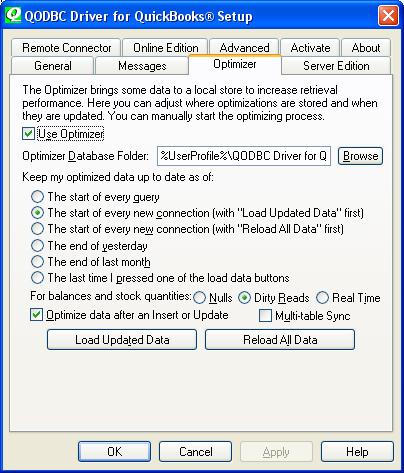
Then login as the primary Windows "Administrator" account and try again. Services are mean't to use the admin account and not Windows user accounts. The issue here is that the QODBC DCOMs and the services that call them are all really designed to be run in the "Administrator"s console.
Note: You may need to create a new System DSN that includes an optimizer file off the root of your C: drive to successfully use the QODBC Optimizer with MS SQL Server 2000.
See the last post in SQL Server 2005 Linked Server unable to run Optimized for further clues. |
|
|
|
