|

Buy Support
Incidents |
|
If you can't find your answer
in the FREE PUBLIC QDeveloper Forum, require URGENT Priority Support, or you need to send us
private or confidential information: |
|
Click Here
|
If you can't
login and post questions or you are having trouble viewing forum posts:
Click Here
|
Callback
Support |
|
If you live in USA, UK, Canada, Australia or New
Zealand, you can leave us details on your question and request us to call you back and discuss
them with you personally (charges apply). |
|
Click Here
|
Buy Support
Incidents |
|
If you can't find your answer
in the FREE PUBLIC QDeveloper Forum, require URGENT Priority Support, or you need to send us
private or confidential information: |
|
Click Here
|
|
| Moved Optimizer Database Folder, now web queries hang |
| Author |
Message |
|
|
| Posted : 2007-06-15 07:27:34 |
I moved the "Optimizer Database Folder" to the data partition on my hard drive since it took up a decent amount of room on my windows partition. I then chose to "reload all data" so that everything would be up to date in the new folder. Now queries go very quickly using the sample VB script program, but none of the queries using PHP will work (including the example DisplaySQL.php) I have let it go for several hours thinking that it may still need to refresh (or optimize), but it just seems to freeze my web server. I have the QODBC driver set up exactly how Tom suggests in another post, and it seemed to work very well before, but now it's stuck. Any advice would be appreciated.
|
|
|
|
| Tom |
 |
| Group | : Administrator |
| Posts | : 5510 |
| Joined | : 2006-02-17 |
|
| Profile |
|
| Posted : 2007-06-15 08:17:54 |
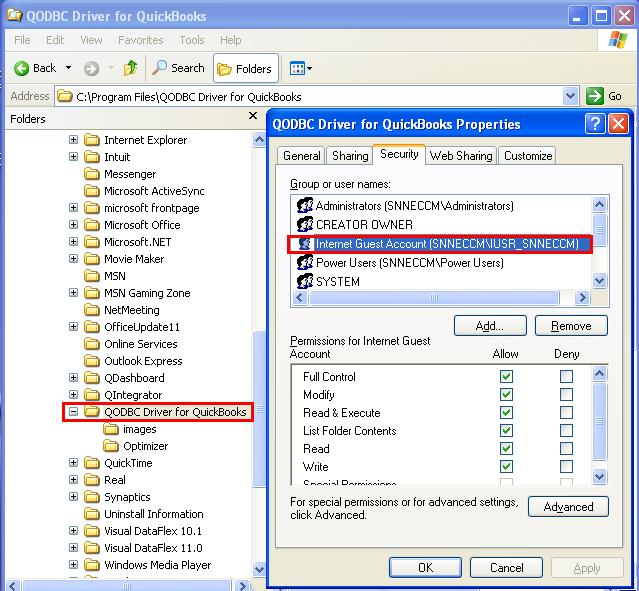
| You also need to the Anonymous web user IUSR_, ASP.NET user and INTERACTIVE all rights to the data partition on your hard drive where the new companyfilename.opt QODBC optimized file is located. |
|
|
|
|
|
| Posted : 2007-06-16 06:43:11 |
| I went through the http://www.qodbc.com/QODBCweb.htm tutorial again, and made sure all permissions were correct, and everything else in the tutorial was correct. Can you think of anything else I might try? |
|
|
|
| Tom |
| |
| Group | : Administrator |
| Posts | : 5510 |
| Joined | : 2006-02-17 |
|
| Profile |
|
| Posted : 2007-06-16 11:15:04 |
|
|
|
|