|

Buy Support
Incidents |
|
If you can't find your answer
in the FREE PUBLIC QDeveloper Forum, require URGENT Priority Support, or you need to send us
private or confidential information: |
|
Click Here
|
If you can't
login and post questions or you are having trouble viewing forum posts:
Click Here
|
Callback
Support |
|
If you live in USA, UK, Canada, Australia or New
Zealand, you can leave us details on your question and request us to call you back and discuss
them with you personally (charges apply). |
|
Click Here
|
Buy Support
Incidents |
|
If you can't find your answer
in the FREE PUBLIC QDeveloper Forum, require URGENT Priority Support, or you need to send us
private or confidential information: |
|
Click Here
|
|
| Network Error - timeout when reporting from two tables |
| Author |
Message |
|
|
| Posted : 2007-07-28 01:10:22 |
I am using crystal reports to report off of QuickBooks. When running the report locally from my computer to the server that has quickbooks my report works. (For this connection I am using Remote Connector and Desktop version read only) When I put my report on the server and run it from internet explorer i get this error.
Network Error (tcp_error)
|
| A communication error occurred: "" |
| The Web Server may be down, too busy, or experiencing other problems preventing it from responding to requests. You may wish to try again at a later time. |
For assistance, contact your network support team. |
Basically its a timeout error. (The web server is running the server edition of QODBC to the remote connector on the server with QuickBooks on it)
My code is as follows:
SELECT "Customer"."JobProjectedEndDate", "Estimate"."CustomerRefFullName", "Customer"."JobDesc", "EstimateLine"."EstimateLineRate", "Estimate"."TotalAmount", "Customer"."JobStatus"
FROM {oj ("Customer" "Customer" LEFT OUTER JOIN "EstimateLine" "EstimateLine" ON "Customer"."ListID"="EstimateLine"."CustomerRefListID") LEFT OUTER JOIN "Estimate" "Estimate" ON ("Customer"."ListID"="Estimate"."CustomerRefListID") AND ("EstimateLine"."TxnID"="Estimate"."TxnID")}
WHERE "Customer"."JobProjectedEndDate">={d '2007-01-01'} AND "Customer"."JobStatus"='Awarded'
This pulls from two tables and times out, but when I pull from just one table it works. My question is why would this time out for two tables and not on the one table?
Thanks a bunch
Steve Fetting |
|
|
|
| Tom |
 |
| Group | : Administrator |
| Posts | : 5510 |
| Joined | : 2006-02-17 |
|
| Profile |
|
| Posted : 2007-07-28 10:11:30 |
Your query actually uses three tables, Customer, EstimateLine and Estimate. Prehaps this is clearer:
SELECT "Customer"."JobProjectedEndDate", "Estimate"."CustomerRefFullName",
"Customer"."JobDesc", "EstimateLine"."EstimateLineRate",
"Estimate"."TotalAmount", "Customer"."JobStatus"
FROM {oj ("Customer" "Customer"
LEFT OUTER JOIN "EstimateLine" "EstimateLine"
ON "Customer"."ListID"="EstimateLine"."CustomerRefListID")
LEFT OUTER JOIN "Estimate" "Estimate"
ON ("Customer"."ListID"="Estimate"."CustomerRefListID")
AND ("EstimateLine"."TxnID"="Estimate"."TxnID")}
WHERE "Customer"."JobProjectedEndDate">={d '2007-01-01'}
AND "Customer"."JobStatus"='Awarded'
and the query runs fine on my small company file. My recommended settings for using QODBC are shown here:
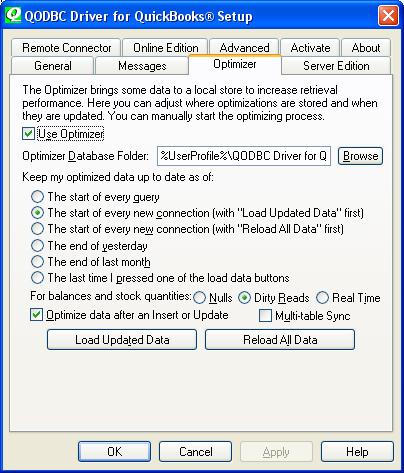
See: How do I setup the QODBC Optimizer? Where are the Optimizer options? for more.
You also need to setup QODBC on the web server. I suggust you use VB Demo on the server first. You can copy and paste the above query into VB Demo to sort out the connection before running the Crystal Reports Server. |
|
|
|
|
|
| Posted : 2007-07-31 03:07:04 |
I recently tried the new way that the code is placed and recieved the same records as the first way. Which is correct, so everything works through VB Demo correctly either way. But even after optimizing the report comes back with the time out error.
Do you know off hand if there is a way to tell crystal reports to reference the optimization file instead of wanting to copy the information everytime. It seems to be just going straight to quickbooks instead of the opt file.
All settings on the server are set to the way that you told me to do, and works good. Just not when viewing a crystal report through Internet Explorer.
Thanks Alot for the help,
Steve
|
|
|
|
| Tom |
| |
| Group | : Administrator |
| Posts | : 5510 |
| Joined | : 2006-02-17 |
|
| Profile |
|
| Posted : 2007-07-31 08:31:03 |
Change the query using "Add Command"
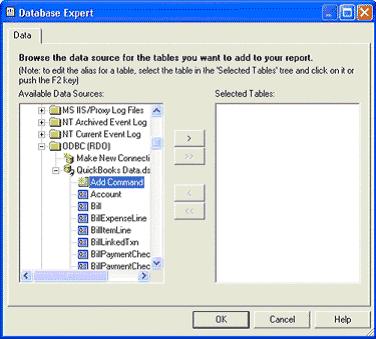
in Crystal Reports to:
SELECT "Customer"."JobProjectedEndDate", "Estimate"."CustomerRefFullName",
"Customer"."JobDesc", "EstimateLine"."EstimateLineRate",
"Estimate"."TotalAmount", "Customer"."JobStatus"
FROM Customer NOSYNC, Estimate NOSYNC, EstimateLine NOSYNC
Where "Customer"."ListID"="Estimate"."CustomerRefListID"
and "Estimate"."TxnID"="EstimateLine"."TxnID"
and "Customer"."JobProjectedEndDate">={d '2007-01-01'}
and "Customer"."JobStatus"='Awarded'
The NOSYNC parameter tag tells QODBC to go directly to the optimized tables. |
|
|
|
|
|
| Posted : 2007-08-02 05:53:27 |
Tom,
Thanks alot that worked... You are one smart guy ! !
Thanks,
Steve |
|
|
|
|