|

Buy Support
Incidents |
|
If you can't find your answer
in the FREE PUBLIC QDeveloper Forum, require URGENT Priority Support, or you need to send us
private or confidential information: |
|
Click Here
|
If you can't
login and post questions or you are having trouble viewing forum posts:
Click Here
|
Callback
Support |
|
If you live in USA, UK, Canada, Australia or New
Zealand, you can leave us details on your question and request us to call you back and discuss
them with you personally (charges apply). |
|
Click Here
|
Buy Support
Incidents |
|
If you can't find your answer
in the FREE PUBLIC QDeveloper Forum, require URGENT Priority Support, or you need to send us
private or confidential information: |
|
Click Here
|
|
| Quickbooks data stale until second read? |
| Author |
Message |
| Ed |
| |
| Group | : Members |
| Posts | : 13 |
| Joined | : 2007-08-28 |
|
| Profile |
|
| Posted : 2007-08-28 10:55:43 |
We have two systems here at this client. Quickbooks Enterprise v7 R8 (QB) is used for all customer checkout and inventory handling. The "Customer System" (CS) is used to manage the other information about the customer. This system (CS) uses Data Access Pages in a web browser and MSODSC Office Web Components to work against a SQL Server back-end. In particular, we want to be able to take the prescriptions that are sold to the customer in QB and quickly import them into CS to match them to the customer history as well as print specialty prescription labels.
While we were a QODBC customer previously (v 4.0.0.0.19) the performance at that time was unacceptable. When we first moved over to QB v7, we purchased a competitor's producte which was supposed to produce a parallel SQL Server database that we could easily query against in our CS. Unfortunately, in spite of significant effort with automated scripts and scheduled tasks that then invoke scripts with embedded DTS (to get around that fact that DTS scheduled tasks would otherwise run in the windows service account -- the scheduled task solves that) it is still too slow. 4-5 minutes per update cycle is unacceptable for the technician to wait before they can get the Sales Receipt Line Item information from QB to CS.
So we went back to our old favorite since the new technology should have made it much faster -- not to mention that it is bundled in QB Enterprise Edition. And it is MUCH faster -- even using the Remote Connector on the server to properly queue requests for the normally closed (at least on the server) company file. Down to about a minute with a closed file, and 30 seconds if I do leave the company file open.
I'll worry about the issues of leaving QB running all day along with the Remote Connector (makes backups of the .qbw a pain) later... If I can solve the one big problem: Every time we run the query to get the latest information from QB (immediately after the Sales Receipt is saved/posted) we don't get the latest information. This is not a timing issue, I can even wait 10 minutes and no change. But if we run the query a second time it works fine. I'm stumped and any/all help would be greatly appreciated. I have the Optimizer set for "On Every Connection" which seems right since each request is a separate connection.
I've included the snippet of code I use to move the QB information via QODBC over to SQL Server so that we can continue to run joins etc against it after a single fast (and hopefully timely) query for all relevant data to QB.
Thank,
-ed cetron
Const adOpenStatic = 3
Const adLockOptimistic = 3
Dim oConnection
Dim oRecordset
Dim sMsg
Dim sConnectString
Dim sSQL
Dim rs
'MsgBox("In DataPageComplete")
on error resume next
'MsgBox "Setting ClientID filter on QB Sales Items"
ClientID = document.all.item("Client ID").value
set rs = MSODSC.Connection.Execute("DELETE FROM SalesLineItem")
sConnectString = "DSN=Home Vet Service;OLE DB Services=-2;"
sSQL = "SELECT CustomFieldClientID, SalesLineDesc, SalesLineQuantity, SalesLineTxnLineID, TxnDate, "
sSQL = sSQL + "Type, SalesLineType FROM SalesLine WHERE CustomFieldClientID = '" & ClientID & "'"
Set oConnection = CreateObject("ADODB.Connection")
Set oRecordset = CreateObject("ADODB.Recordset")
oConnection.Open sConnectString
oRecordset.Open sSQL, oConnection, adOpenStatic, adLockOptimistic
Do While (not oRecordset.EOF)
sMsg = "INSERT INTO SalesLineItem (TxnLineID, ClientID, Description, "
sMsg = sMsg & "Quantity, ServiceDate, TxnType, LineType) VALUES ("
sMsg = sMsg & "'" & oRecordSet.Fields("SalesLineTxnLineID") & "',"
sMsg = sMsg & "'" & oRecordSet.Fields("CustomFieldClientID") & "',"
sMsg = sMsg & "'" & oRecordSet.Fields("SalesLineDesc") & "',"
sMsg = sMsg & "'" & oRecordSet.Fields("SalesLineQuantity") & "',"
sMsg = sMsg & "'" & oRecordSet.Fields("TxnDate") & "',"
sMsg = sMsg & "'" & oRecordSet.Fields("Type") & "',"
sMsg = sMsg & "'" & oRecordSet.Fields("SalesLineType") & "')"
set rs = MSODSC.Connection.Execute(sMsg)
oRecordset.MoveNext
Loop
oRecordset.Close
Set oRecordset = Nothing
oConnection.Close
Set oConnection = Nothing |
|
|
|
| Tom |
 |
| Group | : Administrator |
| Posts | : 5510 |
| Joined | : 2006-02-17 |
|
| Profile |
|
| Posted : 2007-08-28 13:20:48 |
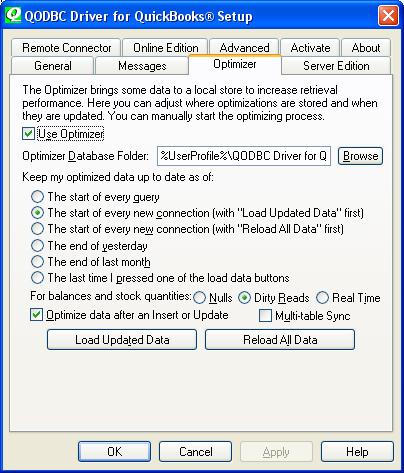
To ensure your updates are seen, check the "Optimize data after an Insert or Update" option in the QODBC Setup Screen Optimizer tab.
|
|
|
|
| Ed |
| |
| Group | : Members |
| Posts | : 13 |
| Joined | : 2007-08-28 |
|
| Profile |
|
| Posted : 2007-08-28 14:29:37 |
Tom,
I can try that -- but I thought the "Optimize data after INSERT or UPDATE" only referred to data INSERT'ed or UPDATE'd via QODBC -- is this actually for when QB itself INSERTS/UPDATES??? Wouldn't that require the QODBC driver to be constantly scanning or triggered from the QB database?
In this situation the data flow is User input ---> QB entry screen --> QB Database Mgr --> QODBC --> ADO query --> SQL Server.... And since I've requested to Optimize on every connection, shouldn't that force this refresh when I do the connect?
Thanks,
-ed cetron |
|
|
|
| Tom |
| |
| Group | : Administrator |
| Posts | : 5510 |
| Joined | : 2006-02-17 |
|
| Profile |
|
| Posted : 2007-08-28 14:44:10 |
The "Optimize data after an Insert or Update" option is only for QODBC updates or inserts. To force QODBC to check for any new data entered manually by QuickBooks users you need to check "The start of every query" option. "The start of every new connection" option will only check when the first query is run for the connection and not when subsequent queries are run. |
|
|
|
| Ed |
| |
| Group | : Members |
| Posts | : 13 |
| Joined | : 2007-08-28 |
|
| Profile |
|
| Posted : 2007-08-28 20:37:45 |
Tom,
I'll try that today and see what happens. But I thought since my VBScript was doing a connect to QB on every query that it was checking/optimizing on every call to QB. Or is the "connection" that the optimizer is keying off of the one from the Remote Connector to QB on the server end? Which also makes no sense since I never re-start the Remote Connector either...
Thanks,
-ed |
|
|
|
| Ed |
| |
| Group | : Members |
| Posts | : 13 |
| Joined | : 2007-08-28 |
|
| Profile |
|
| Posted : 2007-08-31 11:47:13 |
Tom,
Very interesting -- when I do the optimize on every query it doesn't change anything at all. Which is not surprising since my code is designed to only do 1 query per connection. So it still has that funny lag with it. To try and debug further, I turned the optimizer totally off. And after the query took roughly 45 minutes I gave up (and it still didn't retrieve the right information, but then again it wasn't complete).
Any other suggestions? Do I just build two runs through of the query to get past this and discard the first one? Is my query wrong? Is there a better way to get to this data?
Thanks |
|
|
|
| Tom |
| |
| Group | : Administrator |
| Posts | : 5510 |
| Joined | : 2006-02-17 |
|
| Profile |
|
| Posted : 2007-08-31 13:15:23 |
| Actually I would check the time on the workstation to the time setting on the server. |
|
|
|
| Ed |
| |
| Group | : Members |
| Posts | : 13 |
| Joined | : 2007-08-28 |
|
| Profile |
|
| Posted : 2007-08-31 13:33:58 |
Tom,
Workstation is a domain member and time is sync'ed. Also tried it on the Server itself with identical results. And now, I can even get it to match QB at all. I went and forced the optimizer to do a full reload and that hasn't helped. I used the "other product" and it shows what QB shows. And those don't match QODBC. Should I completely eliminate the Optimizer files and start over?
thanks, |
|
|
|
| Tom |
| |
| Group | : Administrator |
| Posts | : 5510 |
| Joined | : 2006-02-17 |
|
| Profile |
|
| Posted : 2007-08-31 15:13:50 |
Ok the real problem here is in what you are doing:-
WHERE CustomFieldClientID = '" & ClientID
Custom fields are not indexed, so QODBC has to do a full table scan here and custom fields are stored in different areas to the transactions. So you might just be seeing QuickBooks lag here.
You need to either move the ClientID into the RefNumber or ask us to modify QODBC to add customized optimizer indexes on the custom field. I'm guessing here that the ClientID is actually the prescription id and the customer name is the patient?
As far as the QODBC optimizer is concerned, you need to setup a dedicated optimizer for Windows Services, see: OpenQuery not return rows for what I mean. |
|
|
|
| Ed |
| |
| Group | : Members |
| Posts | : 13 |
| Joined | : 2007-08-28 |
|
| Profile |
|
| Posted : 2007-09-02 05:03:21 |
Tom,
Great information -- I'm starting to understand what is happening "under the hood". The ClientID number is actually the the equivalent to the QB ListID in the Customer table. It is the unique key for the customer in the Customer System. What the WHERE clause does is retrieve only the salesreceiptlinedetail information (the prescription sold) for that specific customer.
I also found it tends to work well in moving forward, but not backwards --- In doing my testing, I would create a SalesReceipt and then delete it. Creating worked well with the optimizer, deleting tended to force a complete (or relatively extensive) refresh/table scan to update the intermediate database. I've verified this using VBDemo as well.
Would mapping the other way help? In otherwords, instead of putting the Customer System's key into QB, put the QB ListID into the Customer System? Or just use the FullName of the customer/client in the WHERE clause?
Thanks for all your help -- I'm starting to see the light at the end of the tunnel.
|
|
|
|
| Ed |
| |
| Group | : Members |
| Posts | : 13 |
| Joined | : 2007-08-28 |
|
| Profile |
|
| Posted : 2007-09-02 14:07:24 |
Tom,
An update -- you were right on the money. When I change the query to have the WHERE clause matchon CustomerRefListID (I have it in the Customer System just like I have the Customer System ClientID in QB) it runs much faster.
Indeed it ran fast enough that it worked most of the time. Which keyed me to think it was some sort of race condition. Sure enough, I was doing the query that would then be used in a Combo Box dropdown async to the Office Web Components load. When I moved the query up into the "BeforeInitialBind" script (and synchronous now) it worked fast and like a charm.
Thanks for all your help (and BTW, I'd already moved towards specific directories per machine for the dedicated optimizer directories.)
|
|
|
|
|