|

Buy Support
Incidents |
|
If you can't find your answer
in the FREE PUBLIC QDeveloper Forum, require URGENT Priority Support, or you need to send us
private or confidential information: |
|
Click Here
|
If you can't
login and post questions or you are having trouble viewing forum posts:
Click Here
|
Callback
Support |
|
If you live in USA, UK, Canada, Australia or New
Zealand, you can leave us details on your question and request us to call you back and discuss
them with you personally (charges apply). |
|
Click Here
|
Buy Support
Incidents |
|
If you can't find your answer
in the FREE PUBLIC QDeveloper Forum, require URGENT Priority Support, or you need to send us
private or confidential information: |
|
Click Here
|
|
| Problem using Visual Studio 2005 |
| Author |
Message |
| dch |
| |
| Group | : Members |
| Posts | : 3 |
| Joined | : 2006-10-23 |
|
| Profile |
|
| Posted : 2006-10-23 22:56:32 |
Hi,
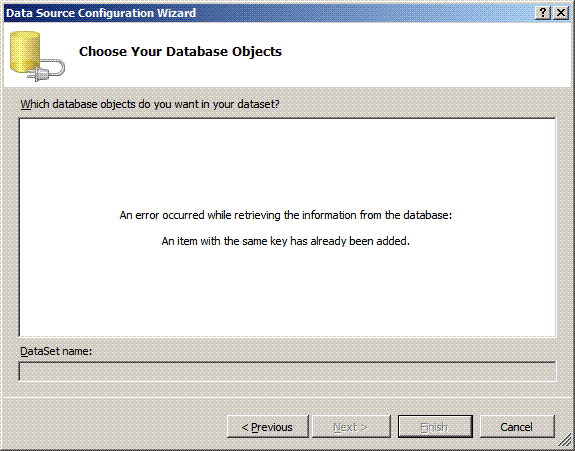
I am using QuickBook 2005 Pro (UK) With QODBC6 - things seems to work OK - but when I try to use QODBC as an ODBC connection in VS2005 (C#), it sets up OK and tests OK, but the setup cannot complete because of the error below...
I have tried switching on/off ODBC compatibilty mode in QODBC but did not make any difference.
Does anybody know what this problem is and how to get around it?
Thanks for any help you can offer. |
|
|
|
| Tom |
 |
| Group | : Administrator |
| Posts | : 5510 |
| Joined | : 2006-02-17 |
|
| Profile |
|
| Posted : 2006-10-24 12:41:56 |
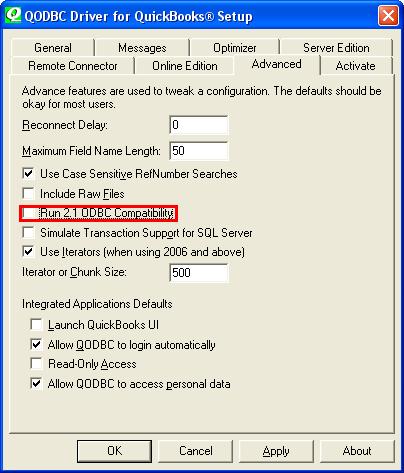
| Check that you are not running QODBC still in 2.1 ODBC Compatibility Mode. This must be unchecked in the QODBC Advanced Setup screen.
If you try to add a QODBC database as a datasource in the datasource box, you will get the message "An error occured while retrieving the information from the database: An item with the same key has already been added." as you show.
However if you go the dataset designer and add a tableadapter it will create the table and add it to the datasources. Only problem with doing it this way is that the UPDATE, INSERT, and DELETE methods aren't created. Appearently this is a bug in Visual Studio 2005. |
|
|
|
|
|
| Posted : 2007-07-05 03:43:34 |
| I am new user testing the software before I buy. I am getting this exact thing in VS2005 even after unchecking the Run 2.1 ODBC compatibility. What else can I check? |
|
|
|
| Tom |
| |
| Group | : Administrator |
| Posts | : 5510 |
| Joined | : 2006-02-17 |
|
| Profile |
|
| Posted : 2007-07-05 08:16:02 |
| You can still connect to ODBC data source using the OdbcConnection class (http://msdn2.microsoft.com/en-us/library/system.data.odbc.odbcconnection.aspx).
The following code is the minimal code required to create a DataSet from the SQL statement and attaches the dataset to a DataGrid:
Dim cnQODBC As System.Data.Odbc.OdbcConnection
Dim daQODBC As System.Data.Odbc.OdbcDataAdapter
Dim dsQODBC As System.Data.DataSet
cnQODBC = New System.Data.Odbc.OdbcConnection("DSN=QuickBooks Data")
cnQODBC.Open()
daQODBC = New System.Data.Odbc.OdbcDataAdapter("SELECT ListID, FullName, CompanyName FROM Customer", cnQODBC)
dsQODBC = New System.Data.DataSet
daQODBC.Fill(dsQODBC)
dgDataGrid.DataSource = dsQODBC
dgDataGrid.DataBind() 'May or maynot be required depending on where you put this code. |
|
|
|
|
|
| Posted : 2008-06-17 04:35:11 |
Hi,
I am experiencing this exact same thing today.
I will need the update / insert capability.
Is this an unresolvable problem for MS Visual studio 2005 or is there a way?
Thanks,
SteveC. |
|
|
|
| Tom |
| |
| Group | : Administrator |
| Posts | : 5510 |
| Joined | : 2006-02-17 |
|
| Profile |
|
| Posted : 2008-06-17 07:35:33 |
| The UPDATE, INSERT, and DELETE methods simply need to be manually created. They are just not automatically created when adding the tableadapter. |
|
|
|
|