|

Buy Support
Incidents |
|
If you can't find your answer
in the FREE PUBLIC QDeveloper Forum, require URGENT Priority Support, or you need to send us
private or confidential information: |
|
Click Here
|
If you can't
login and post questions or you are having trouble viewing forum posts:
Click Here
|
Callback
Support |
|
If you live in USA, UK, Canada, Australia or New
Zealand, you can leave us details on your question and request us to call you back and discuss
them with you personally (charges apply). |
|
Click Here
|
Buy Support
Incidents |
|
If you can't find your answer
in the FREE PUBLIC QDeveloper Forum, require URGENT Priority Support, or you need to send us
private or confidential information: |
|
Click Here
|
|
| Optimizer Help |
| Author |
Message |
|
|
| Posted : 2007-08-09 09:21:10 |
Hi All,
I've read through the Optimizer tips and I am still having trouble getting the fastest setting for how we use qodbc.
I was hoping someone can chime in with some experience and recommendations:
We only need to look at the most up to date invoice entries for the last 2 weeks. We only pull up Invoice and Customer table data.
That's all we need. We use the invoice number as our lookup key.
In this situation do we need the Optimizer at all?
I've tried the different settings and it just takes forever to Optimize since we have a huge QB file.
Any input would be most appreciated. |
|
|
|
| Tom |
 |
| Group | : Administrator |
| Posts | : 5510 |
| Joined | : 2006-02-17 |
|
| Profile |
|
| Posted : 2007-08-09 09:40:16 |
Ok, if I just wanted the last 14 days of invoice lines and simply have no time to setup the QODBC optimizer at the moment, I would do this:
SELECT InvoiceLine.TxnDate, InvoiceLine.InvoiceLineItemRefListID, InvoiceLine.RefNumber,
InvoiceLine.InvoiceLineItemRefFullName, InvoiceLine.InvoiceLineQuantity,
{fn CURDATE()} as Today, ({fn CURDATE()}-14) as "Query Start Date"
FROM InvoiceLine UNOPTIMIZED
WHERE (InvoiceLine.TxnDate > {fn CURDATE()}-14)
See: How do I setup the QODBC Optimizer? Where are the Optimizer options? for my recommended settings. |
|
|
|
|
|
| Posted : 2007-08-16 13:00:23 |
Hi Tom,
Thanks for the reply. I tried that SQL and it actually got slower. Took about almost 2hours to get the result back, this is the SQL statement I used (modifying what you gave me)
select Customer.Email, Customer.Phone, Invoice.RefNumber, Invoice.ShipAddressAddr1, Invoice.ShipAddressAddr2, Invoice.ShipAddressAddr3, Invoice.ShipAddressAddr4, Invoice.ShipAddressCity, Invoice.ShipAddressState, Invoice.ShipAddressPostalCode, Invoice.PONumber, Invoice.ShipAddressCountry, {fn CURDATE()} as Today, ({fn CURDATE()}-14) as "Query Start Date" from Customer UNOPTIMIZED , Invoice UNOPTIMIZED where Invoice.CustomerRefListID=Customer.ListID AND (Invoice.TxnDate > {fn CURDATE()}-14)
when our data is optimized is fairly fast but the thing is we are using this qodbc with our shipping app which needs only the most recent data for shipping the item out same day or the longest 14days.
Did I do something wrong with the SQL. from my understanding the Optimizer is for older data, which is the best setting to get only the recent data? Like I said i've messed with the different settings and the only one I noticed that made a significant change was the dirty reads checkbox as notedin the optimizer tips.
thanks for any help you can give. |
|
|
|
| Tom |
| |
| Group | : Administrator |
| Posts | : 5510 |
| Joined | : 2006-02-17 |
|
| Profile |
|
| Posted : 2007-08-16 23:04:36 |
Good, that's why we put the optimizer in QODBC. What you are seeing is the true QuickBooks speed. Change the query to:-
select Customer.Email, Customer.Phone, Invoice.RefNumber, Invoice.ShipAddressAddr1, Invoice.ShipAddressAddr2, Invoice.ShipAddressAddr3, Invoice.ShipAddressAddr4, Invoice.ShipAddressCity, Invoice.ShipAddressState, Invoice.ShipAddressPostalCode, Invoice.PONumber, Invoice.ShipAddressCountry, {fn CURDATE()} as Today, ({fn CURDATE()}-14) as "Query Start Date" from Customer, Invoice where Invoice.CustomerRefListID=Customer.ListID AND (Invoice.TxnDate > {fn CURDATE()}-14)
Set your optimizer as follows:
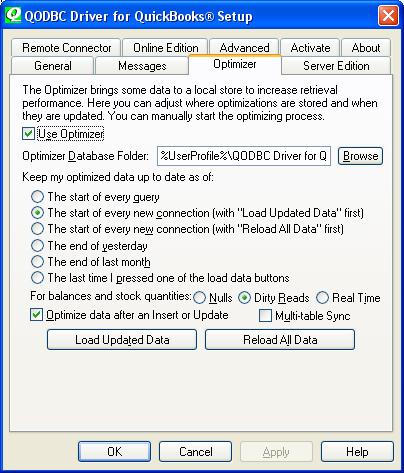
Run:
sp_optimizefullsync Invoice
and:
sp_optimizefullsync Customer
to resync just these tables and let QODBC do the job in future. |
|
|
|
|