| DTS Import SQL Server 2003 |
| Author |
Message |
|
|
| Posted : 2006-11-01 05:50:34 |
I have Quickbooks Pro 2005 Release R8P on my desktop loaded with the main Quickbooks company file.
I have also downloaded and installed 'QODBC Driver for Quickbooks Version 6.0.0.150' evaluation package.
I used 'Configure QODBC Datasource' to modify the 'QuickBooks Data' System DSN to test the connection to my QuickBooks company file and it worked a charm. 'Test Connection to QuickBooks successful'
Now I used a document I found in this forum called 'QBtoSQLServer.doc' to try and DTS QuickBooks data into an SQL Server 2003 database. I get to the point where I have chosen just 4 tables to pull across from QuickBooks.
The package starts to execute and creates the 4 tables as follows on my SQL Server
dbo.Invoice
dbo.InvoiceLine
dbo.ReceivePayment
dbo.ReceivePaymentLine
However once it tries to do the copy data steps it just runs forever. I set this running before I left work for just the dbo.Invoice table and when I came back the following morning it still had not completed. I ran an extract from QuickBooks for AR Ageing detail and it created a CSV file with 28,000 rows so I can't possibly explain this by saying that we just have allot of Invoices
Please tell me what is going on?
Thanks
Dan O'Sullivan |
|
|
|
| Tom |
 |
| Group | : Administrator |
| Posts | : 5510 |
| Joined | : 2006-02-17 |
|
| Profile |
|
| Posted : 2006-11-01 09:38:10 |
| Normally the QODBC Optimizer is switched off when using MS SQL Server and DTS is run on the local (MS SQL Server) database. By the sounds of things DTS might be loading QuickBooks into the background, running a query and then closing QuickBooks over and over again.... which will take forever. Try running QuickBooks first without a company file open with "Launch QuickBooks UI" checked in the QODBC Setup screen before launching DTS. See: How do I setup QODBC to auto-login into QuickBooks and start it if it's not running? for more info. |
|
|
|
|
|
| Posted : 2006-11-03 02:32:08 |
I have QODBC Optimizer switched off. I am also able to execute 'VB Demo 32' the following SQL to get a result set in the grid.
SELECT * FROM Invoice where BalanceRemaining <> 0
this takes about 8 minutes to return the resultset of 1,081 rows which I thought was a bit slow.
I also used 'Launch QuickBooks UI' in "QODBC Setup Screen" and also everything under "How do I setup QODBC to auto-login into Quickbooks and start if it's not running" is identical in my setup
I was wondering if I should have "Use DCOM Servers" checked ? I have tried both with no success.
So clearly the QODBC Driver is configured and delivers data fine through 'VB Demo 32' application.
Now just to be clear; I have Quickbooks Pro 2005 installed on my local XP desktop. I have the evaluation version of the QODBC installed locally on my desktop. I have Enterprise Manager 2003 running on my local client but I am trying to DTS the data to a table on a MSSQL Server 2003 production box.
I cannot install Quickbooks Pro 2005 on the SQL Production 2003 Server.
I also tried the same process to an SQL Server 2005 box and the same thing happens.
The source data is found throught the QODBC driver, the SQL parses fine, the table is created on the Server, the package executes but it stays executing forever.
The strange thing is that I was able to import the Account table with out a problem although again it was extremely slow for such a small amount of records
Please let me know if I need to be running this data into a local database on my client. Also please let me know if this product isn't meant to be used for DST in the real world |
|
|
|
| Tom |
| |
| Group | : Administrator |
| Posts | : 5510 |
| Joined | : 2006-02-17 |
|
| Profile |
|
| Posted : 2006-11-03 08:56:14 |
| Most QODBC uses setup QuickBooks and QODBC on their Server and DTS to the local SQL Server database on the server. They use DCOM and we also set the Iterator or Chunk Size in the Advanced Tab in the QODBC Setup Screen up to accomodate the largest record set. The default is 500, you should set it to 20,000. |
|
|
|
|
|
| Posted : 2006-11-03 09:03:50 |
I'm not seeing anything called Iterator or Chunk Size in the Advanced Tab in the QODBC Setup Screen ?
Would you please send me a detailed document showing exactly how to DTS data into SQL Server 2003
from Invoice table. |
|
|
|
| Tom |
| |
| Group | : Administrator |
| Posts | : 5510 |
| Joined | : 2006-02-17 |
|
| Profile |
|
| Posted : 2006-11-03 09:11:15 |
| That's because you evaluating a old version of QODBC. You should be using QODBC v7.00.00.200, not v6.00.00.150. Another QODBC customer has been nice enough to make a document on how he used QODBC via MS SQL Server Data Transformation Services to import all of the tables into SQL Server. To view the document, click here: http://qodbc.com/docs/support/QBtoSQLServer.doc |
|
|
|
|
|
| Posted : 2006-12-20 20:40:37 |
Hi,
I too have the same problem. I've gone through all of the recommendations here and it takes for ever - if it all to import from QB to MSSQL server. While I'm using the DTS wizard, the preview shows data from QB with no problem and quite fast at that, but once I run the import job it creates the table and sits there.
If there is something I'm missing I'd really like to know. This is a make or break evaluation point for my project, and I really would like to use QODBC but I'm really stuck.
I'm using QB 2004, and the latest QODBC ver. (7.x).
Help?
Thanks,
Arlo |
|
|
|
| Tom |
| |
| Group | : Administrator |
| Posts | : 5510 |
| Joined | : 2006-02-17 |
|
| Profile |
|
| Posted : 2006-12-20 21:43:48 |
The real way to do this is to first optimize your tables by using the [ Load Updated Data ] or [ Reload All Data ] (if you have just started using QODBC) option in the QODBC setup screen.
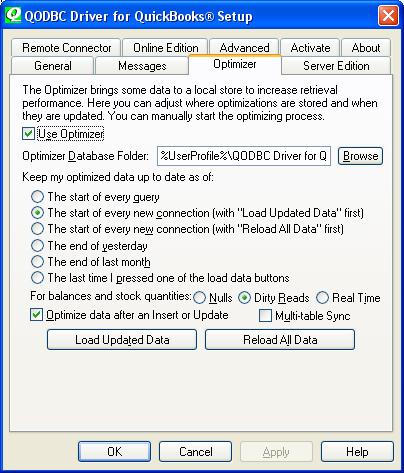
Once optimization is completed (the time this takes is dependent on the size of your company file), use queries, not copy tables, with the NOSYNC command in the DTS Import/Export Wizard:
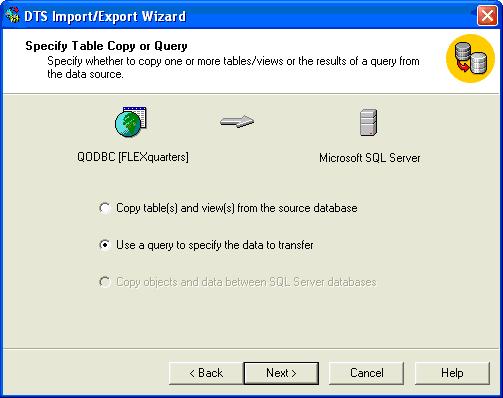
like this for each of the tables you wish to import:
select * from Invoice NOSYNC
select * from InvoiceLine NOSYNC
See: Using DTS to Load QuickBooks Data into Microsoft SQL Server for more on how to transfer all the QuickBooks tables. |
|
|
|
|
|
| Posted : 2006-12-21 11:08:04 |
Ah, much better!
Thank you very much - that time it only took about 30 seconds instead of several hours.
-Arlo |
|
|
|
|
|
| Posted : 2008-10-01 06:41:20 |
When I add the NOSYNC command to the end of the query in DTS I get:
Error Source: Microsoft OLE DB Provider for ODBC Drivers
Error Description: [QODBC] Unexpected extra token: NOSYNC
Context: Error calling Prepare on the command text.
Thanks |
|
|
|
| Tom |
| |
| Group | : Administrator |
| Posts | : 5510 |
| Joined | : 2006-02-17 |
|
| Profile |
|
| Posted : 2008-10-01 13:42:21 |
The NOSYNC tag is used immediately after the TableName and not at the end of the query line. For example:
select * from InvoiceLine NOSYNC WHERE Txndate > {d '2008-04-01'} |
|
|
|
|
|
| Posted : 2008-10-02 02:39:29 |
So I must have a "WHERE" clause to use the NOSYNC tag? My statement was:
select * from SalesOrder NOSYNC
As I wanted all SalesOrder records. |
|
|
|
|
|
| Posted : 2008-10-02 04:55:08 |
Never mind, when I eliminated the trailing ";" it worked fine.
Thanks |
|
|
|
