Member Login

Username
Password
Forget Password
New Sign Up
Search Forum

Buy Support
Incidents

If you can't find your answer in the FREE PUBLIC QDeveloper Forum, require URGENT Priority Support, or you need to send us private or confidential information:

Click Here
If you can't login and post questions or you are having trouble viewing forum posts:
Click Here
Callback
Support

If you live in USA, UK, Canada, Australia or New Zealand, you can leave us details on your question and request us to call you back and discuss them with you personally  (charges apply).

Click Here
 
Buy Support
Incidents
If you can't find your answer in the FREE PUBLIC QDeveloper Forum, require URGENT Priority Support, or you need to send us private or confidential information:
Click Here

Forum : SQLConnect : crashes when called from within legacy appSearch Forum

Forum Home > QODBC - ODBC Driver for QuickBooks > QODBC v7 Forum

 New Topic 
 
 Post Reply 
[1]  
 SQLConnect : crashes when called from within legacy app 
 Author   Message 
  lindsaye 
  
 Group: Members 
 Posts: 6 
 Joined: 2007-09-21 
 Profile
 Posted : 2007-09-21 04:51:52

hi - i really need your help with this!

i have a self contained routine (that i am using for testing the QODBC driver) - the main portions of the code is below (i can email you the entire c file if you require).

When i call this routine from a self contained VS 6.0 application the code works beautifully - it connects and queries QuickBooks and displays the data.

However, when i compile this into a legacy C application and call this routine the SQLConnect routine fails - catastrophically!  Total crash and it yanks the entire application out of memory!  It does not return from the SQLConnect call.

When i change the routine to connect and query a SQL Server datasource (as opposed to the QuickBooks DNS) the routine works fine under both circumstances!  So this implies it implies it is something to do with connecting via the QODBC driver.

I have been investigating this for 3 days and my brain is hurting.  Is there anything you can think of that would cause the loading of or connecting via the QODBC driver that could cause such an error?

The legacy application uses ODBC conenctions with SQL server without any problems - it just seems to crash when loading the QODBC driver. 

Code :

SQLHANDLE EnvHandle;
SQLHANDLE ConHandle;
SQLRETURN rc = SQL_SUCCESS;

SQLCHAR DBName[20] = "QBBellTran";
SQLCHAR DBUser[20] =
""
;
SQLCHAR DBPass[20] =
""
;

rc = SQLAllocHandle(SQL_HANDLE_ENV, SQL_NULL_HANDLE, &EnvHandle);

rc = SQLSetEnvAttr(EnvHandle, SQL_ATTR_ODBC_VERSION, (SQLPOINTER) SQL_OV_ODBC3, SQL_IS_UINTEGER);

rc = SQLAllocHandle(SQL_HANDLE_DBC, EnvHandle, &ConHandle);

rc = SQLConnect(ConHandle, DBName, SQL_NTS, DBUser, SQL_NTS, DBPass, SQL_NTS);

If calls SQLConnect and crashes - windows does not catch it, no error message, no nothing - the entire application is yanked out of memory.

Any help is greatly apprecaited.

Please let me know if you need any more information.


  Top 
  Tom 
  6c3c1_sdk-qodbc.gif
 Group: Administrator 
 Posts: 5510 
 Joined: 2006-02-17 
 Profile
 Posted : 2007-09-21 08:12:44

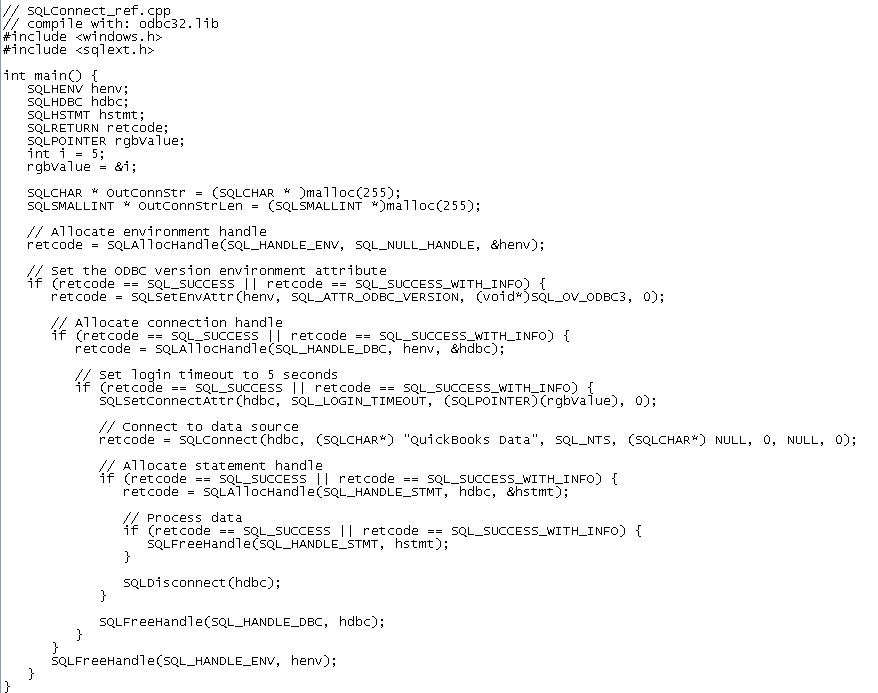
Sorry, this isn't a C support forum. In the following example, an application allocates environment and connection handles. It then connects to the 'QuickBooks Data' data source. When it has finished processing data, it disconnects from the data source and frees the handles.


  Top 
  lindsaye 
  
 Group: Members 
 Posts: 6 
 Joined: 2007-09-21 
 Profile
 Posted : 2007-09-21 23:29:44

Thanks for the reply.

I am not really looking for C support - i know the C ODBC32 API really well as I thought i illustrated in my example and your code example pretty much duplicated what i posted.

I am needing help with any ideas why the driver would totally crash when called using  SQLConnect or SQLDriverConnect and only when called when the routine is called from within a legacy application.

This is a major block for us and it is only happening with your driver as i indicated - SQL Server and Pervasive SQL ODBC DNS work perfectly well in both situations.

We have many clients who we are going to reccomend QuickBooks to but it is all dependant on getting an ODBC connection.  If we cannot then we will have to switch and reccomend AccPac - which we can get working.  So a lot is depending on your assistance with this issue. 

I am looking for much lower level information about how the driver works and loads into memory - as there is obviously something wrong with the runtime environment or handles/pointers.  Does it require a lot of memory/stack space/heap?  As i am calling it from a legacy aplication, assume it was written for old 16-bit windows in C and therefore ha old compiler directives and memoery models.  Is there anything that you can think of that may cause an issue for your driver?  As the problem is SQLConnect it is when the driver is loaded or when the connection routine is called or returns. 

I did discover one further thing - after the crash I cannot close QuickBooks as it still thinks that an application is connected to the Company file - i assume this would be the ODBC driver that failed.  Does this mean that the driver loaded and connected but the return from the driver to the ODBC caused the issue?

Any (and i mean any) ideas that you can come up with that could help us look in a direction would be greatly apprecaited.  We have been looking through this for 4 days now - tearing our code, our environments (and the odbc libraries) apart, trying loads of differnet ways to do this and cannot find anything that has made a difference.  So any fresh thoughts or if you have any pointers on how your driver works so we can use that in our investigation would be great.

thanks again for your time.


  Top 
  lindsaye 
  
 Group: Members 
 Posts: 6 
 Joined: 2007-09-21 
 Profile
 Posted : 2007-09-22 05:21:40

RESOLVED!

I finally figured out my issue.  it was an old task swapper that was buried in the legacy application that (i am sure) is causing the issue.  It was not restoring the state correctly before executing the C test code.

The above C source code works fine, as i indicated, the problem was the old legacy application was setting up and environment that the ODBC32 API could not use with the QODBC driver.  This does indicate that the QODBC driver is making the ODBC32 library use large or far pointers.


  Top 
 New Topic 
 
 Post Reply 
[1]  

Jump to