Member Login

Username
Password
Forget Password
New Sign Up
Search Forum

Buy Support
Incidents

If you can't find your answer in the FREE PUBLIC QDeveloper Forum, require URGENT Priority Support, or you need to send us private or confidential information:

Click Here
If you can't login and post questions or you are having trouble viewing forum posts:
Click Here
Callback
Support

If you live in USA, UK, Canada, Australia or New Zealand, you can leave us details on your question and request us to call you back and discuss them with you personally  (charges apply).

Click Here
 
Buy Support
Incidents
If you can't find your answer in the FREE PUBLIC QDeveloper Forum, require URGENT Priority Support, or you need to send us private or confidential information:
Click Here

Forum : QuickBooks info from registrySearch Forum

Forum Home > QODBC - ODBC Driver for QuickBooks > QODBC v7 Forum

 New Topic 
 
 Post Reply 
[1]  
 QuickBooks info from registry 
 Author   Message 
  Vlad 
  
 Group: Members 
 Posts: 32 
 Joined: 2007-09-25 
 Profile
 Posted : 2007-09-28 03:44:05

I'm working on integration QuickBooks into VB6 application. Not all machines with the application are going to have QuickBooks installed. In order to avoid using of the code written especially for those machines where QuickBooks exists, I'd like to check if QuickBooks is there on every start of the application.

I have a code (VB6) wich can return the list of all programs installed on the machine. I need to filter all returned values to get only those related to QuickBooks.

Since I have QODBC V7, I'm going to allow to run QuickBooks stuff only on workstations where any edition of QuickBooks 2002, 2003, 2004, 2005, 2006 and 2007 is presented.

In order to filter values I need to know how the versions older than mine are presented in the registry.

On my machine I have QuickBooks Premier: Accountant Edition 2007

I would ask everybody who has any different version or edition to check the value in the registry:


[HKEY_LOCAL_MACHINE\SOFTWARE\Microsoft\Windows\CurrentVersion\Uninstall\{7E545666-F423-45FD-B3DF-C0B99A1A579F}]

Check DisplayName value.

I need all possible variations.

If anybody else is interested in the code I have I can provide it (VB6 code for now, later I'm going to create VB2005 version)

Thank you

Vlad


  Top 
  Tom 
  6c3c1_sdk-qodbc.gif
 Group: Administrator 
 Posts: 5510 
 Joined: 2006-02-17 
 Profile
 Posted : 2007-09-28 08:22:47

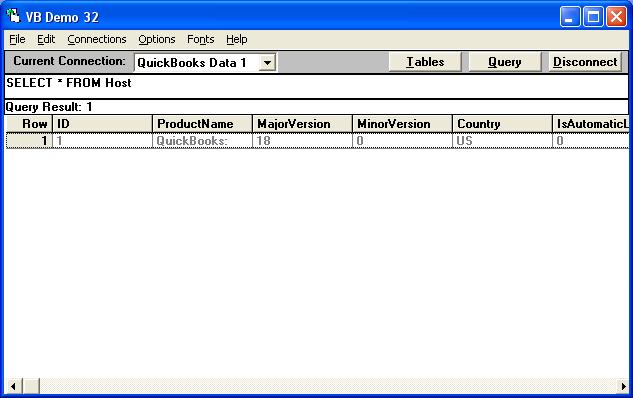
You can tell what version of QuickBooks QODBC is connected to by looking at the Host table.

More detailed information is also contained in the HostMetaData and HostSupportedVersions tables.


  Top 
  Vlad 
  
 Group: Members 
 Posts: 32 
 Joined: 2007-09-25 
 Profile
 Posted : 2007-09-28 11:58:55

No, my question is not in how to get the version of QB on my machine.

I have QuickBooks Premier: Accountant Edition 2007

I'm interested in the versions in what other people have in their registry. For instance

QuickBooks Premier: Accountant Edition 2003 (if it exists of course). At least I'd like to know if all versions and editions starting from 2002 have words 'QuickBooks', 'Edition' and '2007', '2004' etc in their entries in the registry. If yes then I will be able to retrieve the value from a registry on the client machine by code in my program make decision if my code can be used there. For instance my program uses QODBC 7, the client installed my program and QB 2007, then she upgrades to QB 2008. But my program cannot work with it, so instead of producing an error I would like to check the version of QB every time my program starts and either allow to run or not.

So, one more time: I need to know how other versions are presented in the registry

Thank you

Vlad


  Top 
  Tom 
  6c3c1_sdk-qodbc.gif
 Group: Administrator 
 Posts: 5510 
 Joined: 2006-02-17 
 Profile
 Posted : 2007-09-29 06:37:23

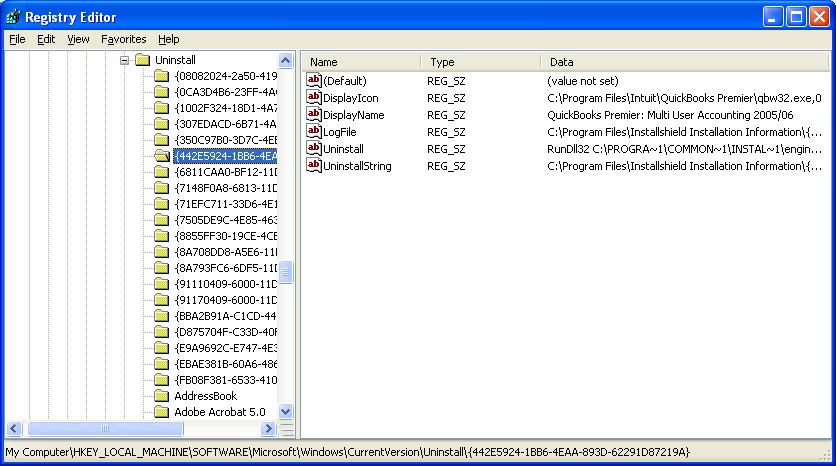
I think your method isn't going to work. But here's one off the computer I'm using right now......

Most of us just look for a qbw32.exe.


  Top 
  Vlad 
  
 Group: Members 
 Posts: 32 
 Joined: 2007-09-25 
 Profile
 Posted : 2007-09-29 08:30:38

qbw32.exe exists for any version of QuickBooks as I understand. If so what will happen if my client has a version prior to 2002? Or newer than 2007 (currently I have QODBC 7, I upgraded it to version 8 without buying a new CD Key, so it's not going to work with QB 2008)?

The current version of qbw32.exe is 17.0.4008.564. Who knows when it's going to be changed?

So, for me just to check if qbw32.exe exists doesn't look like a good approach to check if my code and drivers I gave to my clients are going to work.

If for instance I find that the entry in the registry contains sets of characters as 'QuickBooks', 'Edition' and '2002' or '2003 or...'2007' it means that I can allow to run my code. If no then all features are disabled.

What's wrong with this approach?

Thank you

Vlad


  Top 
  Tom 
  6c3c1_sdk-qodbc.gif
 Group: Administrator 
 Posts: 5510 
 Joined: 2006-02-17 
 Profile
 Posted : 2007-09-30 08:36:19
Well, you can tell what version of QuickBooks QODBC is connected to by looking at the Host table, regardless whether you are licensed to use it or not and you tell your users that your prodact can only be used with QuickBooks 2004 or later because 2002 is hopeless, and 2003 has very limited functionalitiy. 

  Top 
 New Topic 
 
 Post Reply 
[1]  

Jump to