|

Buy Support
Incidents |
|
If you can't find your answer
in the FREE PUBLIC QDeveloper Forum, require URGENT Priority Support, or you need to send us
private or confidential information: |
|
Click Here
|
If you can't
login and post questions or you are having trouble viewing forum posts:
Click Here
|
Callback
Support |
|
If you live in USA, UK, Canada, Australia or New
Zealand, you can leave us details on your question and request us to call you back and discuss
them with you personally (charges apply). |
|
Click Here
|
Buy Support
Incidents |
|
If you can't find your answer
in the FREE PUBLIC QDeveloper Forum, require URGENT Priority Support, or you need to send us
private or confidential information: |
|
Click Here
|
|
| Turning on optimizer has made it slower |
| Author |
Message |
|
|
| Posted : 2007-09-08 01:20:58 |
I'm just beginning to use this product. I'm using PHP to access the "DisplaySQL.php" file that came with the install.
Yesterday, I had it working. It was querying my QBW file and displaying the customer table, although it was very slow.
Last night I turned on the "Use Optimizer" button and chose the settings in the image below:
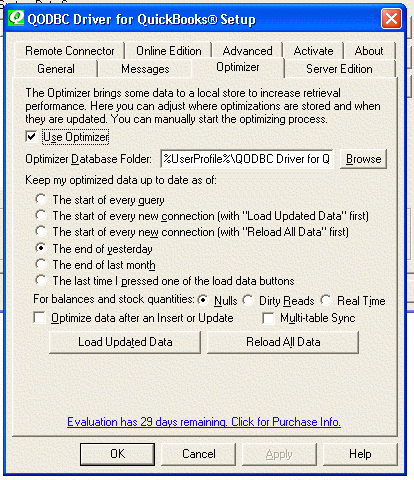
I clicked on the "Load Updated Data" button last night to make sure that the data would be here in the morning.
Now it doesn't work at all. The "DisplaySQL.php" file has been churning in my browser for about 25 minutes now.
Apparently turning on the Optimizer broke something.
Can someone help me?
Thanks. |
|
|
|
| Tom |
 |
| Group | : Administrator |
| Posts | : 5510 |
| Joined | : 2006-02-17 |
|
| Profile |
|
| Posted : 2007-09-08 21:11:11 |
The QODBC optimizer is single user only. So you need to setup a different optimizer file for PHP to use than the other disktops applications. To do this step up a seperate System DSN (see: How do I create or configure a QODBC DSN? ) and specify a fixed location of the optimizer database folder for PHP to use instead of the default UserProfile method (normally C:\Program Files\QODBC Driver for QuickBooks\). Give read and write rights to the optimizer folder to the Anonymous web user IUSR_machinename, ASPNET user and INTERACTIVE. This also allows access to the DCOM server executables.
To repair, for example the optimized Customer table, you can run:
SELECT * FROM Customer VERIFY WHERE ListID = 'x' |
|
|
|
|