|

Buy Support
Incidents |
|
If you can't find your answer
in the FREE PUBLIC QDeveloper Forum, require URGENT Priority Support, or you need to send us
private or confidential information: |
|
Click Here
|
If you can't
login and post questions or you are having trouble viewing forum posts:
Click Here
|
Callback
Support |
|
If you live in USA, UK, Canada, Australia or New
Zealand, you can leave us details on your question and request us to call you back and discuss
them with you personally (charges apply). |
|
Click Here
|
Buy Support
Incidents |
|
If you can't find your answer
in the FREE PUBLIC QDeveloper Forum, require URGENT Priority Support, or you need to send us
private or confidential information: |
|
Click Here
|
|
| Record Return |
| Author |
Message |
|
|
| Posted : 2007-08-08 03:03:21 |
Hey Tom,
I got another question for you.
Is there a limit as to how many records can be returned or accessed at one time.
The reason why I ask is because on my crystal report when i'm developing it shows all 4745 records. But when I put it out on the internet it cuts off about 600 records or so of my Z's.
Just wondering so I know if its me, cause I heard that there is a limitation as to how many records can be returned on the web server edtion to like 3500 records or something of the sort.
Thanks for the help
Steve |
|
|
|
| Tom |
 |
| Group | : Administrator |
| Posts | : 5510 |
| Joined | : 2006-02-17 |
|
| Profile |
|
| Posted : 2007-08-08 10:09:43 |
| No there's no limit is QODBC. I often have users complaining that 37,000 records took 25 minutes, while only 476 records took 20 seconds, to be returned. The only limitation is when using QODBC with the QuickBooks Online Edition (QBOE). QBOE will not return records (or rows) where the number of rows in the query set is over 1,000. |
|
|
|
|
|
| Posted : 2007-08-14 06:39:52 |
Question..
How come in my crystal report it shows all of the projects from (ZZ Bidding) which is a company we do business. There are 25 projects that need to be pulled. But when I put it live on the internet it only shows 6. It seems like it starts to read them all but stops at C in the alphabet when there is projects that start with L, U, W, N, P and so on.
Source Code:
SELECT "Customer"."FullName", "Customer"."JobDesc", "Estimate"."TotalAmount", "Customer"."JobStatus", "Estimate"."TxnDate"
FROM Customer, Estimate
WHERE "Customer"."ListID"="Estimate"."CustomerRefListID"
Thanks,
Steve
|
|
|
|
| Tom |
| |
| Group | : Administrator |
| Posts | : 5510 |
| Joined | : 2006-02-17 |
|
| Profile |
|
| Posted : 2007-08-14 08:06:41 |
My guess is that you haven't setup your optimizer correctly for web service, try:
SELECT "Customer"."FullName", "Customer"."JobDesc", "Estimate"."TotalAmount",
"Customer"."JobStatus", "Estimate"."TxnDate"
FROM Customer UNOPTIMIZED, Estimate UNOPTIMIZED
WHERE "Customer"."ListID"="Estimate"."CustomerRefListID"
While it will be slow, it will show all the projects. The QODBC optimizer is single user only, so you need to setup a different optimizer file for the Crystal Reports Server to use than the other disktops applications. To do this step up a seperate System DSN (see: How do I create or configure a QODBC DSN? ) and specify a fixed location of the optimizer database folder for Crystal Reports Server to use instead of the default UserProfile method. Make sure the Crystal Reports Server has full read/write rights to the folder where you decide to setup the optimizer file.
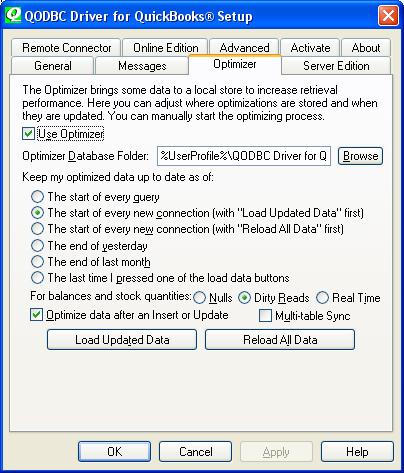
You can also force a resync of the optimizer file and fix the optimized tables while running your query by doing:
SELECT "Customer"."FullName", "Customer"."JobDesc", "Estimate"."TotalAmount",
"Customer"."JobStatus", "Estimate"."TxnDate"
FROM Customer VERIFY, Estimate VERIFY
WHERE "Customer"."ListID"="Estimate"."CustomerRefListID" |
|
|
|
|