|

Buy Support
Incidents |
|
If you can't find your answer
in the FREE PUBLIC QDeveloper Forum, require URGENT Priority Support, or you need to send us
private or confidential information: |
|
Click Here
|
If you can't
login and post questions or you are having trouble viewing forum posts:
Click Here
|
Callback
Support |
|
If you live in USA, UK, Canada, Australia or New
Zealand, you can leave us details on your question and request us to call you back and discuss
them with you personally (charges apply). |
|
Click Here
|
Buy Support
Incidents |
|
If you can't find your answer
in the FREE PUBLIC QDeveloper Forum, require URGENT Priority Support, or you need to send us
private or confidential information: |
|
Click Here
|
|
| Non English characters do not convert correctly |
| Author |
Message |
|
|
| Posted : 2007-09-12 16:54:32 |
Hello,
We have the UK version of Quickbooks and we bring data into Access thru an ODBC pass thru query.
In the memo fields in the invoiceLine table, we have non-english characters. When we show these onto an Access Report, the characters do not convert correctly. Is there a way to overcome this?
Thank you for your help.
Chris
|
|
|
|
| Tom |
 |
| Group | : Administrator |
| Posts | : 5510 |
| Joined | : 2006-02-17 |
|
| Profile |
|
| Posted : 2007-09-13 11:16:56 |
|
|
|
|
|
| Posted : 2007-09-17 15:52:16 |
I tried the replace function as you suggested. I even debug.printed each character code of the string coming back from ODBC. Unfortunately, the replacements are not unique. It seems like any greek character letter without an english equivalent is replaced by a certain ascii code character.
Is there an ODBC function that will return the original string in the field without character conversion taking place? |
|
|
|
| Tom |
| |
| Group | : Administrator |
| Posts | : 5510 |
| Joined | : 2006-02-17 |
|
| Profile |
|
| Posted : 2007-09-18 15:15:25 |
With a little care, you can try using the RAW table instead. For example:
select RefNumberraw, CustomerRefFullNameraw, Memoraw from Invoiceraw
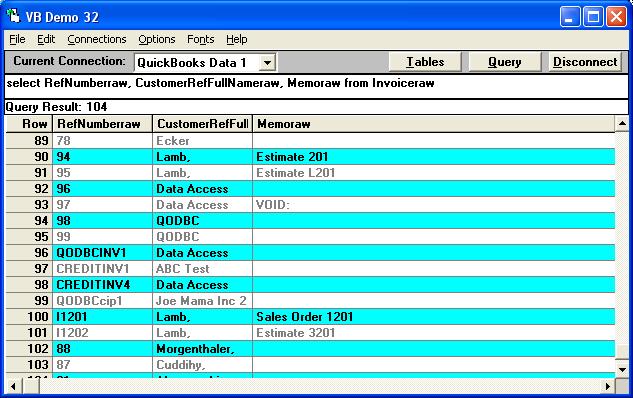
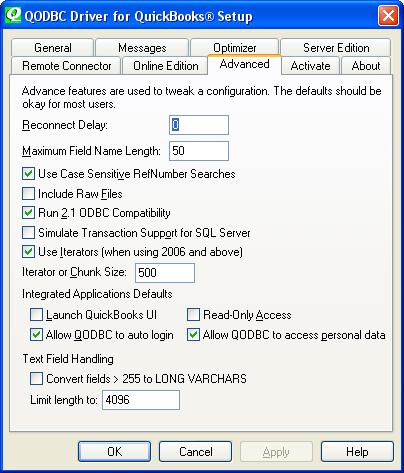
Check the Include Raw Files: option in the QODBC Setup Screen to access them.
|
|
|
|
|